

A workflow application is a purpose-built software solution that automates and manages a specific business process from start to finish — routing tasks, triggering notifications, enforcing approvals, and tracking status without manual intervention.
Unlike generic workflow automation software, which provides a platform for building many processes, a workflow application is the finished product: the leave request system your HR team uses, the purchase order approval tool your finance team relies on, or the IT support ticket handler your operations team runs every day.
Whether it’s creating and sending invoices or posting marketing campaigns on social media, handling repetitive tasks daily can lead to procrastination. Workflow process offers a solution by helping you automate these processes with the help of no-code technology.
With features like integration, process mapping, and reporting, these apps streamline business processes, making your job more efficient.
If you’re uncertain about their importance, key features, types, and use cases.This article will guide you through the essentials, offering insights into how workflow software solutions can transform your productivity and business operations.
What is a Workflow Application?
A workflow application sits at the intersection of process automation and software development. It is not a generic tool — it is a purpose-specific application that encodes your organisation’s exact business rules, approval hierarchies, and data requirements into a digital process that runs automatically. Quixy’s no-code aPaaS platform allows enterprise teams to build workflow applications without developer involvement, deploying production-ready apps in hours rather than months.
A workflow application is purpose-built software that encodes your organisation’s exact business rules, approval hierarchies, and data requirements into an automated digital process. It is not a generic tool — it is a specific application built for a specific process.
The key distinction is this:
| Workflow Automation Software | Workflow Application | |
|---|---|---|
| What it is | The platform used to build processes | The finished product built on that platform |
| Example | Quixy’s no-code aPaaS platform | The employee onboarding app built using Quixy |
| Who uses it | IT teams, process designers | End users — HR, finance, operations staff |
| Scope | Builds many different workflows | Manages one specific business process |
Quixy’s no-code aPaaS platform allows enterprise teams to build workflow applications without developer involvement — deploying production-ready applications in hours rather than months. Each application is fully customisable to your organisation’s specific approval chains, data fields, user roles, and escalation rules.
What are the Features of a Workflow Application?
To streamline business processes and enhance productivity, workflow apps typically include the following key features:
Process mapping and modeling
Visually design, document, and map business processes to get a clear map of each step, decision point, and task. The feature highlights inefficiencies and optimizes workflows through an intuitive drag-and-drop interface. It ensures clear communication and efficient process execution.
Automation and task assignment
Automate repetitive tasks and assign work based on predefined rules. You configure criteria, and the system automatically routes tasks to the right individuals or teams. This minimizes delays, ensures consistency, and allows your staff to focus on strategic activities.
Integration
Connect your workflow tool with other essential business systems like CRM, ERP, and communication platforms. Enabling these systems to share data avoids information silos and ensures real-time data flow across your operations.
Notification and alerts
Get real-time updates on task statuses, deadlines, and critical issues. It ensures your team never misses important milestones or encounters unexpected delays. You customize alerts to trigger for specific events, and they can be delivered via email, SMS, or in-app messages.
Reporting and analytics
Generate reports that visualize task completion rates, identify bottlenecks, and track KPIs to assess overall efficiency. You customize these reports to focus on metrics that matter most to your goals, enabling data-driven decisions.
Also Read: Visual Workflow Builder: Simplifying Process Automation
Why Businesses Need a Workflow Application?
A recent Gartner report predicts that by 2026, 30% of enterprises will automate more than half of their network activities, a steep rise from under 10% in mid-2023. This statistic reflects a growing consensus: automation is no longer optional—it’s a business imperative.
In an environment where speed, accuracy, and agility determine success, manual processes are becoming liabilities. Delays, human errors, scattered communications, and poor visibility into task ownership can derail critical operations. As organizations scale, these inefficiencies grow exponentially.
The best workflow applications solve this problem at the core. By digitizing and standardizing workflows, businesses can:
1. Eliminate repetitive manual tasks
2. Accelerate decision-making with real-time insights
3. Improve accountability with clearly defined roles
4. Enhance collaboration across departments
5. Ensure audit-ready compliance at all times
Most importantly, AI workflow applications free up your teams to focus on high-impact work instead of getting stuck in operational chaos. The right workflow application drives efficiency, resilience, and growth. Want to see how? Dive into 10 reasons why workflows matter for your business.
Now let’s understand its application. How does it work?

What are the Different Types of Workflow Applications?
The beauty of workflow applications lies in their adaptability. Depending on your business needs, technical setup, and team involvement, you can choose from a variety of types that serve different purposes. Let’s explore them one by one:
Organizational Workflow Applications
These are human-centric workflows designed to guide people through tasks like approvals, documentation, or service requests.
- Tasks appear in user worklists.
- Users pick tasks and complete them manually (pull model).
- Best for teams where decision-making, communication, and oversight are critical.
Software Workflow Applications
These workflows are built for machine-to-machine communication.
- No human input needed once set up.
- Uses APIs, web services, and backend systems to complete tasks.
- Perfect for organizations that need fast, error-free backend automation.
Hybrid Workflow Applications
This is the best of both worlds—combining human tasks with system automation.
- Users interact with forms, while the system performs validations or backend actions.
- Ideal for dynamic business processes involving both user input and automated system execution.
Inter-Organizational Workflow Applications
These workflows operate across multiple organizations, like between partners, vendors, or clients.
- Supports data exchange, compliance, and visibility across entities.
- Great for businesses with external-facing operations.
- Vendor management, purchase order approval across companies
Mobile Workflow Applications
Workflows designed for mobile-first teams—field agents or as remote workflow applications for remote workers, or on-the-go managers.
- Perform tasks, approvals, or updates from smartphones or tablets.
- Enhances agility and responsiveness in decentralized teams workflows.
- Service ticket closure, field survey data entry, mobile approvals through workflow mobile applications
AI-Powered or Agentic Workflow Applications
Welcome to the future of workflows, agentic ai workflow applications that are powered by AI agents and automation intelligence.
- AI predicts decisions, routes tasks, and even initiates workflows.
- Ideal for businesses focused on scaling smart automation.
- Customer ticket prioritization, auto-assigning leads based on behavior
Cloud-Based Workflow Automation (SaaS)
These are workflow automation SaaS platforms hosted on the cloud.
- Easy to set up, maintain, and scale.
- Offer drag-and-drop builders, pre-built templates, and integration-ready systems.
Industry-Specific Workflow Applications
Tailored to unique industry needs, these apps solve domain-specific workflow challenges.
- Healthcare: Claims processing, patient record management
- Legal: Case tracking, document review
- Finance: Expense tracking, loan approvals
- Healthcare management workflow applications, clinical workflow software, legal workflow automation
Explore Use Cases of Workflow Automation Applications
OCBC’s AI Success
OCBC, Southeast Asia’s second-largest bank, turned decades of data strategy into real AI wins:
- 20+ years of AI investment, serving 19 markets
- Unified 399 out of 900 systems under one data platform
- Deployed 300+ AI models across operations
- Cut 50% of money laundering alerts and automated 70% of KYC reviews
- 250,000+ AI-assisted content tasks done monthly
- 400,000+ internal docs searchable with AI
- 20% boost in developer productivity for 500+ users
- 500+ wealth managers supported with real-time AI insights
- Hundreds of hours of calls are transcribed daily
- Onboarding times slashed with AI-driven document workflow automation
A clear example of how long-term vision, unified data, and strategic execution can drive AI at scale — securely, efficiently, and ahead of the curve.
CPG Giant’s Sustainability Transformation
A leading US-based multinational CPG company turned environmental goals into measurable results, proving sustainability can drive both impact and innovation.
- Set a 2030 goal to reduce plastic, forest, water use, and GHG emissions by 50%
- Achieved a 40.9% reduction in Scope 1 and 2 GHG emissions
- Reduced natural forest fiber usage by 39%
- Decreased plastic footprint by 16.4%
- Integrated 3,600+ safety and compliance checks into core operations
- Embedded ESG data collection into daily workflows across business units
- Ranked among the Top 100 Most Sustainable US Companies in 2024
- ESG-driven innovation led to increased market share despite price pressures
This CPG company shows how sustainability, when embedded into daily operations, not only meets regulatory and ethical expectations but also delivers real business growth.
BNP Paribas Bank Polska – Digital Transformation Snapshot
BNP Paribas Bank Polska turned a decade of complex M&A activity into a streamlined, future-ready IT operation, with measurable outcomes that drive growth, resilience, and agility:
- Completed full IT integration after 5 mergers by 2020.
- Cut 20% of legacy applications to reduce technical debt.
- Adopted a hybrid multicloud to accelerate app delivery.
- Tripled IT deployments in 2023 vs. 2022.
- Rolled out 70+ AI use cases across business and operations.
- Shifted 75% of IT teams to an agile, product-workflow based applications structure.
- Reduced critical system incidents by 35%.
- Achieved 100% automation in internal reporting.
- Boosted NPS ranking to #4 in Poland through improved digital experience.
BNP Paribas Bank Polska proves that a strong IT foundation — built with focus, agility, and resilience — enables fast, secure, and customer-centered transformation.
Workflow Application Examples Across Business Departments
The following examples represent the most common workflow applications deployed by enterprises today. Each one replaces a manual, paper-based or email-driven process with an automated application that routes work, enforces rules, and tracks every step in real time.
Here are the common workflow app exmples that can help you understadn more in details
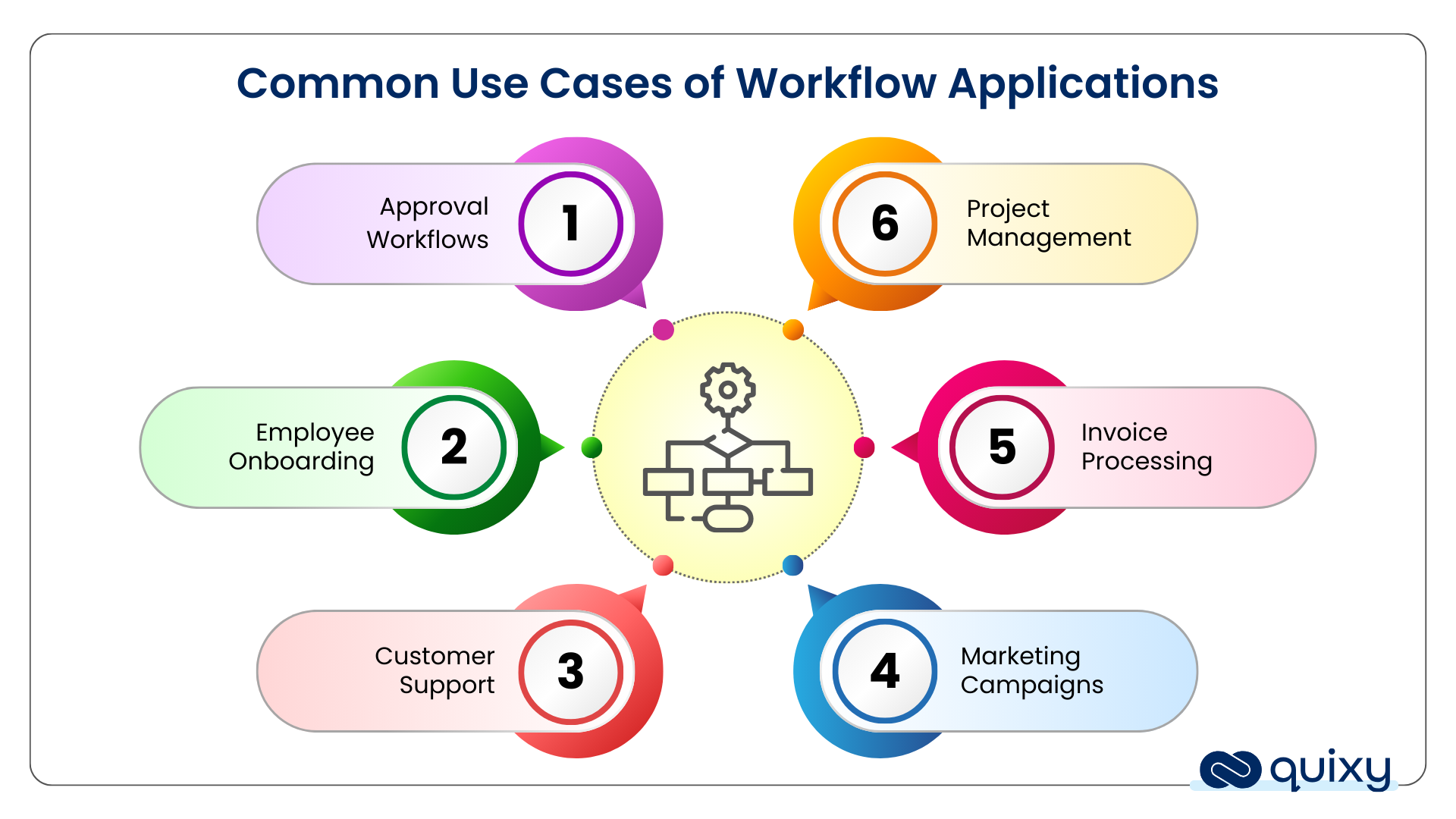
Workflow applications are most commonly used for:
Approval workflows
Approval workflows automate the review and authorization process for documents, requests, or expenses. For instance, a purchase order might automatically move through departments for manager and finance approval based on predefined criteria, ensuring swift validation.
Employee onboarding
Employee onboarding workflows streamline the process of integrating new hires into your company. For example, these workflows automatically guide new employees through paperwork. Automating such tasks ensures efficient processing, reducing the time required to make new hires productive.
Customer support
In customer support workflows, tickets are automatically routed based on issue type, priority, or customer account. For instance, if a VIP customer reports a software bug, the ticket is escalated to senior technicians. This workflow ensures prompt attention, improves resolution rates, and offers comprehensive visibility for both the support team and the customer.
Marketing campaigns
Marketing campaign workflows automate campaign creation, execution, and tracking. For example, email marketing workflows can categorize leads based on engagement levels and automatically send personalized emails to each segment. This automated workflow leads to higher efficiency and better audience targeting.
Invoice processing
In invoice processing workflows, invoices are automatically routed through departments for review and approval. For instance, when a vendor submits an invoice, the system matches it against purchase orders and delivery records, highlighting discrepancies for the finance team. After verification, invoices are sent for management approval and then scheduled for payment. This reduces manual errors and speeds up payment cycles.
Project management
Project management workflows help teams plan, allocate, and track tasks for various projects. For instance, a workflow can automatically assign tasks based on team members’ expertise and availability. This workflow ensures transparency and allows project managers to oversee progress efficiently.
If your team is in operations specifically, here’s a focused breakdown of the internal apps operations managers can build without raising a single IT ticket.
How to Build a Workflow Application Without Code
Building a workflow application no longer requires a development team or months of IT work. With a no-code aPaaS platform like Quixy, business users can go from process idea to live application in hours.
Here is how it works in practice:
Step 1 — Map your process Identify the specific business process you want to automate. Define the trigger (what starts it), the steps (who does what), the rules (conditions and approvals), and the outcome (what completion looks like).
Step 2 — Build your form Use Quixy’s drag-and-drop form builder to create the data entry interface — fields, dropdowns, file uploads, signatures. No code required.
Step 3 — Design your workflow In the visual workflow builder, connect each step with rules. Set who receives tasks, what conditions trigger approvals or rejections, and what happens at each decision point.
Step 4 — Set notifications and escalations Configure automated email, SMS, or in-app alerts at each stage. Set escalation rules for tasks that exceed time limits.
Step 5 — Test and deploy Run the workflow in Quixy’s sandbox environment, test with a small group, and deploy to your full team — all without IT involvement.
See the full guide: Workflow Automation in 6 Simple Steps →
Workflow Application in Action: Real-World Result
Yum! India — one of the world’s largest quick-service restaurant groups managing brands including KFC — replaced their paper-based restaurant training audit process with a custom workflow application built on Quixy.
The application automated their Restaurant Training Score audits and On-the-Job Evaluations: field managers now submit assessments via mobile, the application routes results automatically, generates real-time reports, and triggers follow-up tasks without any manual coordination.
Result: 90% efficiency improvement. Zero manual documentation. Deployed across hundreds of locations.
See more Quixy customer success stories →
How to Choose the Right Workflow App for Your Business?
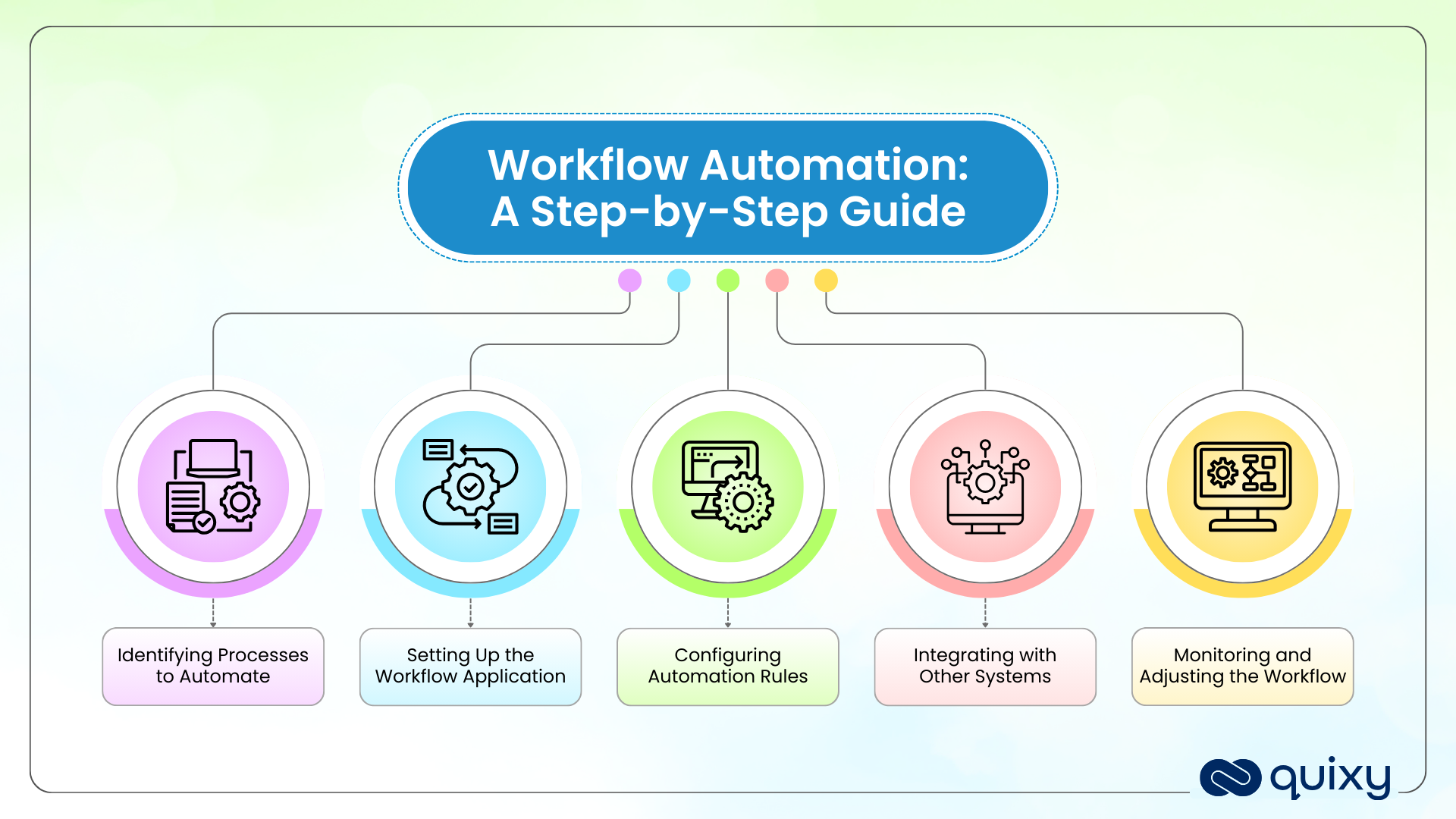
60% of software buyers regret a purchase made in the past 12-18 months (source). To ensure you do not end up investing in a workflow app that is not for your business, consider these factors before making the purchase:
Assess your business needs
Identify your organization’s specific pain points and objectives. For instance, are you looking to automate approvals, streamline project management, or improve compliance?
Understand the processes that require optimization and choose an application that can be tailored to meet these challenges. Prioritizing your business needs ensures the workflow tool provides immediate value and enhances productivity.
Also Read: 11 Tips to Selecting the Right Workflow Automation Software
Check security and compliance capabilities.
Ensure the tool you invest in provides strong data protection measures like encryption and role-based access. Check that it complies with relevant industry regulations, such as GDPR or HIPAA, to secure sensitive information.
Additionally, look for audit trails and logging features to monitor activities, supporting both internal and external audits and ensuring regulatory compliance.
Look for customer support and training modules
Ensure the vendor offers comprehensive support channels like live chat, email, or phone assistance. Check if training resources, including tutorials, webinars, and documentation, are available to help your team understand the tool’s features.
Quick, reliable support and effective training are crucial for a smooth onboarding process and resolving technical issues promptly.
Also Read: Why Choose Quixy as your Workflow Automation Tool?
Conclusion
Choosing the right workflow application platform is crucial for your business’s efficiency and productivity. Among the available options, Quixy shines as the best workflow management software applications due to its LCNC approach, drag-and-drop builder, and flexible integration capabilities.
Quixy simplifies workflow automation while offering extensive custom components for quick implementation with endtoend workflow management applications . By empowering your team with intuitive tools, ai workflow automation. ensures smooth, customizable workflo ws that optimize operations, helping you reach your strategic goals and enhance your business growth.
Frequently Asked Questions(FAQs)
Q. What is the difference between a workflow application and workflow automation software?
Workflow automation software is the platform used to build and run automated processes. A workflow application is the finished product built on that platform. Think of workflow automation software as the factory and workflow applications as the products it produces. For example, Quixy is the workflow automation software — the leave request system your HR team uses every day is the workflow application.
Q. What are examples of workflow applications in business?
Common examples include employee leave request systems, purchase order approval tools, IT support ticket handlers, customer onboarding portals, expense claim processors, field inspection apps, vendor onboarding systems, and compliance audit trackers. Each one automates a specific, repeatable business process from submission to completion.
Q. Can I build a workflow application without coding?
Yes. No-code platforms like Quixy allow business users to build custom workflow applications using a drag-and-drop builder without writing a single line of code. Applications that previously required months of developer time can be built and deployed in hours.
Q. What features should a workflow application have?
Key features include automated task routing, role-based access control, multi-level approval chains, real-time status tracking, automated notifications and escalation rules, integration with existing systems (ERP, CRM, HRMS), mobile accessibility, and a full audit trail for compliance.
Q. How is a workflow application different from a regular business app?
A regular business app manages or displays data. A workflow application actively moves work through a defined process — assigning tasks to the right person, enforcing rules at each step, tracking progress in real time, and ensuring every step is completed in the correct sequence before the next one begins.
Related Post

Please login to comment
0 Comments
Oldest
Recent Posts







- Download the App







