

No-code automation tools let enterprise teams — operations, HR, finance, procurement, and compliance — build workflows, automate approvals, and eliminate manual processes without writing code or depending on IT. Unlike traditional workflow software that requires developer involvement, no-code automation platforms use visual drag-and-drop builders that non-technical users can deploy in hours.
Enterprise-grade platforms like Quixy support complex multi-step workflows, conditional logic, SLA escalation, role-based access controls, audit trails, and integrations with ERP and CRM systems. This guide covers the top 25 no-code automation tools in 2026, categorised by use case and enterprise readiness.
What is No-Code Automation?
No-code automation is the practice of building automated workflows, approval processes, and business applications using visual interfaces — without programming. Enterprise no-code automation platforms handle the complexity that used to require developer involvement: conditional routing, multi-stakeholder approvals, system integrations, and real-time data flows.
The term covers a spectrum from simple task triggers (Zapier connecting two apps) to full enterprise workflow platforms (Quixy automating a 12-step vendor onboarding process across five departments). Understanding where on this spectrum you need to operate determines which tool is right for you.
No-code automation is also called codeless automation — both terms describe the same category. If you have seen either in a search or in an analyst report, they refer to tools that use visual builders, drag-and-drop logic, and pre-built connectors rather than code.
- 84% of organisations already use no-code or low-code tools
- 85% of enterprises will run automation in most core processes by 2029
- 90% faster build cycles reported by teams using no-code automation vs traditional development
- 4 days of average time for Quixy customers to deploy their first automated workflow
The enterprise distinction matters. Many tools called “no-code automation” are personal productivity tools — connecting Gmail to Slack, adding rows to a spreadsheet when a form is submitted. Enterprise no-code automation is fundamentally different: it involves multi-department processes, approval hierarchies, compliance requirements, data governance, and integrations with mission-critical systems like SAP, Oracle, or Salesforce.

What are the Benefits of No-Code Automation?
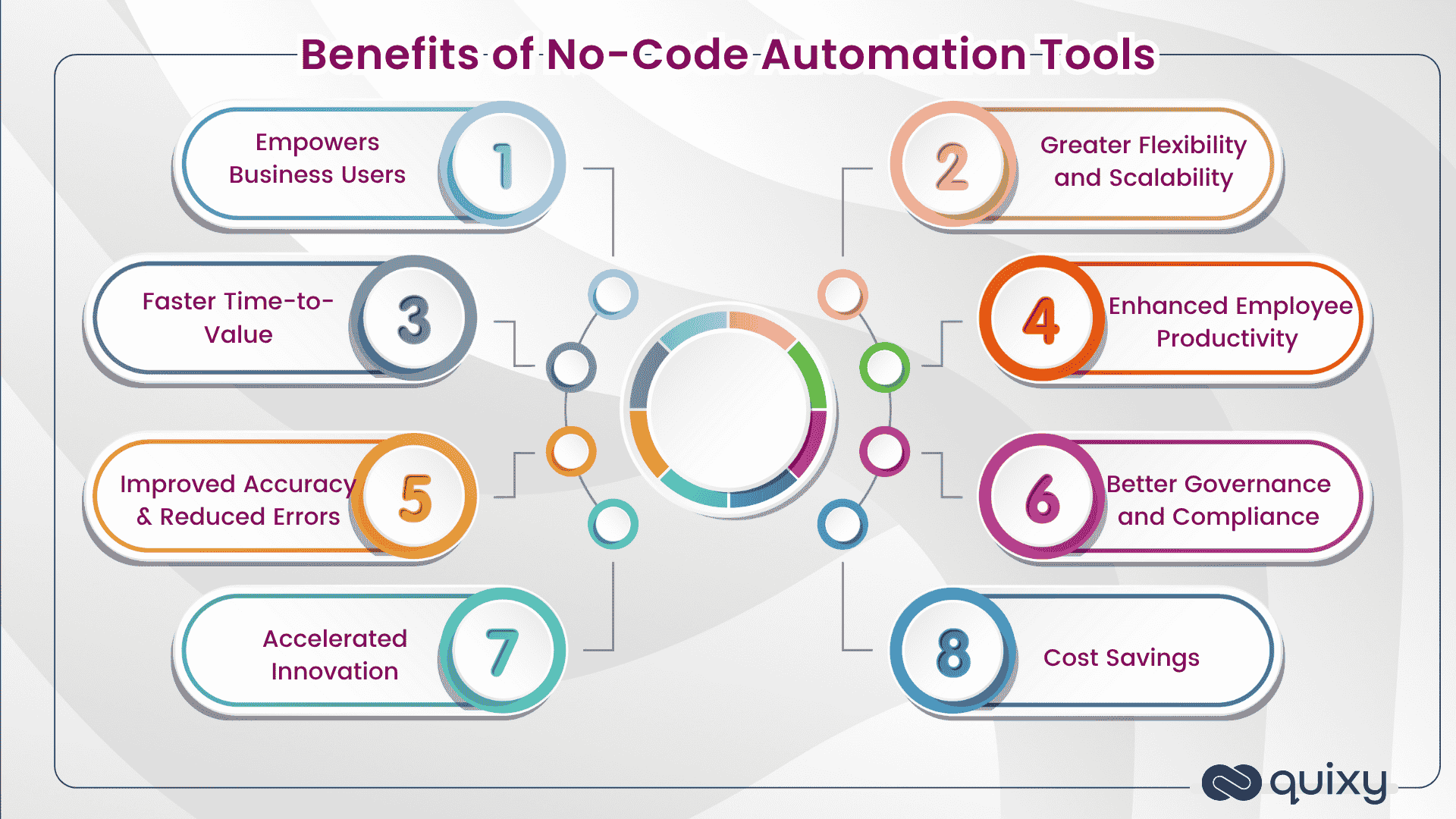
No-code automation has become a game-changer for organisations of all sizes. Here is why so many businesses are adopting it — and what each benefit means in practice.
Empowers business users
Non-technical employees — citizen developers — can automate their own tasks and workflows instead of waiting for IT support or developer bandwidth. This boosts agility across the entire organisation.
Faster time-to-value
Visual drag-and-drop interfaces and ready-to-use templates dramatically reduce development time. What once took weeks or months of coding can now be accomplished in days — sometimes hours.
Significant cost savings
Traditional development requires specialised talent and long development cycles. No-code automation minimises the need for dedicated developer resources and reduces maintenance costs — freeing budget for strategic initiatives.
Improved accuracy and fewer errors
Manual processes lead to mistakes, rework, and inconsistencies. Automated workflows ensure processes run reliably and consistently — reducing human error and enhancing overall data quality.
Greater flexibility and scalability
As business needs evolve, no-code solutions let teams quickly adjust workflows, add new steps, or integrate additional tools — without reworking the entire system or writing new code.
Enhanced employee productivity
By automating mundane and repetitive work, employees can focus on more meaningful, strategic tasks. This not only improves productivity but also increases job satisfaction and engagement.
Better governance and compliance
Modern no-code automation platforms come with built-in security, audit trails, and compliance features — making it easier to maintain oversight and ensure processes meet regulatory requirements.
Accelerated innovation
When teams can build and iterate without technical bottlenecks, innovation flourishes. New ideas can be tested, launched, and refined more quickly — giving businesses a genuine competitive edge.
Types of No-Code Automation Tools
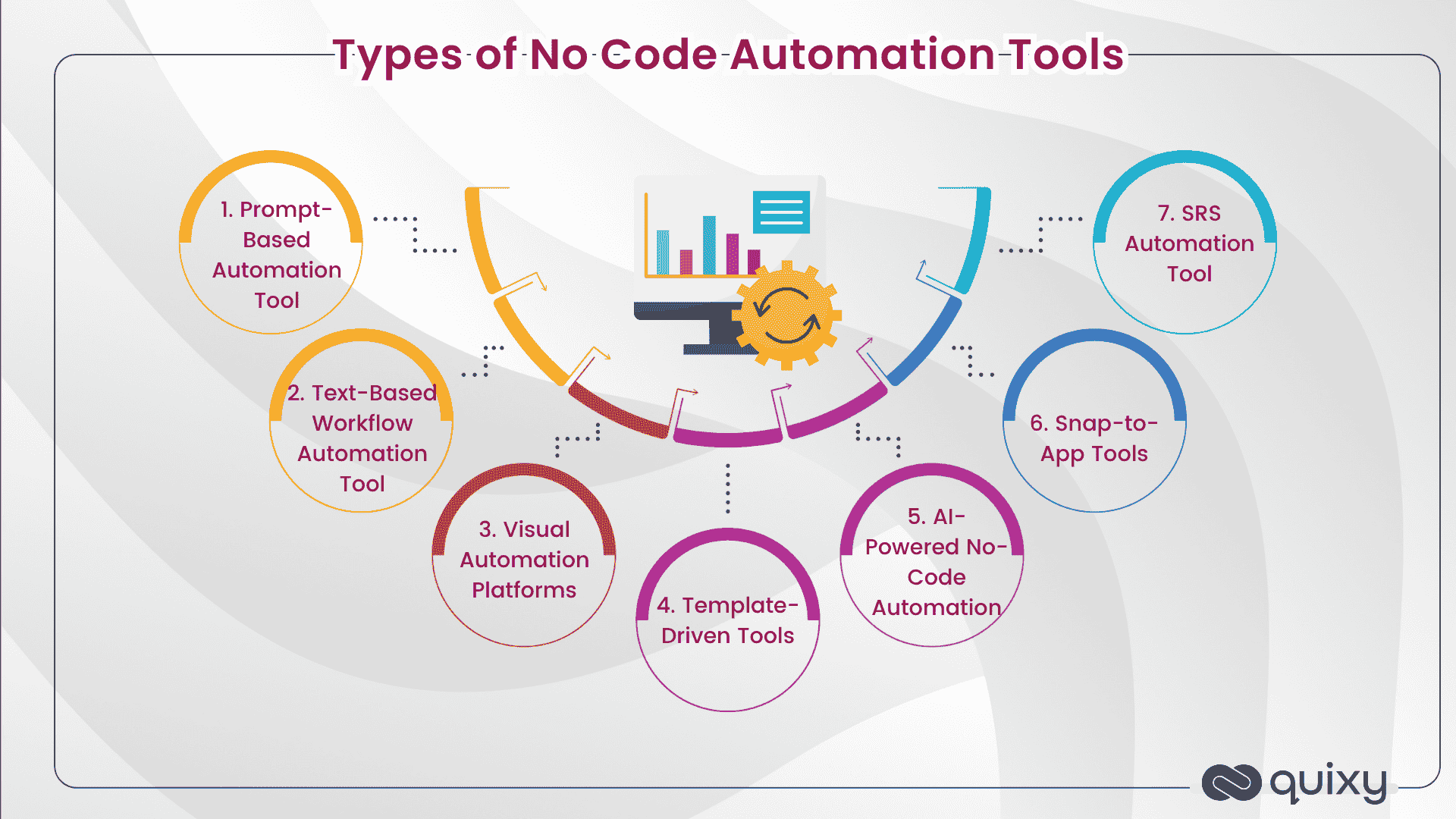
No-code automation tools are not interchangeable. Each type solves a different problem for a different user. Matching the tool type to your actual use case prevents costly platform migrations later.
1. Prompt-based automation tools
These tools work through natural language commands — written or spoken. You simply tell the system what to do, like asking a virtual assistant to send an email or summarise meeting notes. The tool interprets your intent and performs the task. This type is intuitive and fast, especially for everyday tasks, but may require clear and specific prompts to handle complex workflows accurately.
Best for: Quick, one-off tasks or content generation.
2. Visual automation platforms
Visual tools use a drag-and-drop interface to let users design workflows with blocks, connectors, and real-time data paths. They are excellent for understanding how each step flows into the next and for managing multi-branch logic without getting lost in text. Many of these tools also let you monitor workflows live — seeing where data goes and what executes when.
Best for: Complex workflows with conditional logic or integrations across multiple tools.
3. Template-driven tools
These platforms come with pre-built automation templates or “recipes” for common use cases — such as sending thank-you emails after purchases or updating a CRM when a lead is added. You simply plug in your tools and go. They are perfect for beginners or busy teams who want to automate without much setup time.
Best for: Fast deployment of standard automations with little to no customisation.
4. AI-powered no-code automation
AI-enhanced platforms go beyond simple rule-following. They can analyse data, generate content, make decisions, and personalise outcomes. These tools often combine natural language processing with automation logic to make workflows smarter and more adaptive.
Best for: Automating tasks that require interpretation, personalisation, or decision-making.
5. Snap-to-App tools
These cutting-edge tools allow you to turn static ideas — like diagrams, mockups, or even sketches — directly into functional apps with minimal manual intervention. You can “snap” a design and instantly generate an app layout or prototype, dramatically speeding up the build phase.
Best for: Rapid prototyping, turning ideas into working apps almost instantly.
6. SRS automation tools
SRS (Software Requirements Specification) automation tools help you convert detailed ideas, business requirements, or structured documents directly into functional app blueprints — sometimes even into working app modules. Instead of manually documenting every requirement and handing it off to developers, these tools let you capture your needs in a standardised document and automatically translate them into application components. Best for: Transforming detailed requirement documents into ready-to-build apps quickly, especially in fast-paced or large-scale development environments.
Top 25 No-Code Automation Tools in 2026
Tools are organised by category — enterprise workflow platforms first, then integration connectors, then lightweight and specialist tools. Your best choice depends on your process complexity, team technical level, and existing systems. All original tool descriptions are preserved and updated for 2026.
Enterprise workflow & app automation platforms
1. Quixy
Quixy is an enterprise no-code platform that lets citizen developers build applications and automate workflows without writing code. Its drag-and-drop builder supports 40+ form field types — including facial recognition, QR code scanning, field calculation, and sub-forms — with a built-in Sandbox for testing before deployment. Ready-to-use templates cover applicant tracking, employee onboarding, leave management, and project management, and the platform is fully brandable.
What separates Quixy from simple automation connectors is process depth: conditional routing, parallel approval paths, SLA escalation, and full audit trails — all configurable by non-technical users. Quixy sits within the VividMinds Technologies ecosystem alongside Caddie (AI operational intelligence) and GuideNow (digital adoption), and is available on Google Play for mobile access.
Best for: Enterprise and government organisations automating complex multi-department workflows in operations, HR, procurement, compliance, logistics, and field service. Recognised in Gartner Peer Insights Voice of the Customer for 3 consecutive years.
2. Notion
Collaboration
Notion is a digital workspace used for note-taking, management of data, knowledge, tasks, and projects. Its building-block approach lets you create your own layout and structure for your team. You can build wikis, capture spreadsheets, track projects, and manage databases — all in one place. Notion’s automation features allow you to trigger actions based on database changes, making it a solid choice for teams that want a single hub for information and lightweight process tracking.
Best for: Knowledge management and lightweight project tracking with simple automation. Not a replacement for enterprise workflow platforms for complex approval or compliance processes.
3. Budibase
Open Source
If you are looking for a new and better way to design, build, and launch SaaS applications and internal tools, Budibase is worth exploring. Buildbase allows you to create internal tools that enhance team efficiency. It is open-source and free to download and self-host — making it attractive for teams with data sovereignty requirements or limited budgets.
Best for: Technical teams wanting open-source internal tool building with self-hosted control.
Integration and connector tools
4. Zapier
Integration
Zapier is a top favourite among entrepreneurs, makers, and startups, as it allows integration of platforms with popular web applications. Think of it as a glue that connects a plethora of apps — with over 9,000 app integrations, it is the most widely adopted no-code automation connector. You define a “Zap” — a workflow triggered by an event in one app that causes actions in others. Excellent for connecting the tools you already have for straightforward trigger-and-action automations.
Best for: Teams connecting SaaS tools with straightforward trigger-and-action automations. Not designed for complex enterprise workflow management with approval hierarchies and governance controls.
5. IFTTT
Lightweight
Similar to Zapier, IFTTT (If This Then That) allows simple automation. If you are a beginner, IFTTT’s user-friendly UI is the perfect match for basic automations. It is free to use for limited applets, with an annual fee for publishing custom integrations. Best for simple single-step consumer and small business automations.
Best for: Personal automations and simple single-step business triggers. Not an enterprise solution.
6. Make (formerly Integromat)
Integration
Previously known as Integromat, Make uses a drag-and-drop interface to connect services and build multi-step automation that saves hours each week. Without a single line of code, you can build workflows, manage CRM routing, route emails, and automate your business in multiple ways. Make’s pricing model is based on operations rather than tasks — making it more cost-effective than Zapier at scale. It has a steeper learning curve and is better suited to technical operations teams.
Best for: Technical operations teams building complex multi-branch automations across SaaS tools at scale.
7. Airtable
Database + Automation
Airtable has multiple automation tools suited for beginners and experts alike. It provides the functionality of a database with its spreadsheet hybrid tool. You can collaborate with team members, build database-focused internal tools, and use 100+ integrations. Airtable lets you use the platform free up to 1,200 records with 2GB attachment space and two weeks of history. Its automation engine triggers actions when records change — useful for teams whose primary data hub is Airtable.
Best for: Teams whose data lives in Airtable who want lightweight automation built on top of that data. Limited governance for regulated enterprise environments.
8. Typeform
Forms + Automation
Typeform is the perfect online automation tool if high conversion rates are what you are aiming for. With their conversational approach, Typeform is extremely helpful in creating forms and surveys. It also drives productivity by offering integration with over 500 applications — connecting form submissions to your CRM, email platform, and workflow tools automatically.
Best for: Lead capture, customer feedback, and survey automation with seamless CRM integration.
Project management with automation
9. ProofHub
Project Management
ProofHub is a project planning software that puts all the right tools in one place, allowing you to plan, collaborate, organise, and deliver projects on time. Features include Kanban boards, Gantt charts, custom workflows, discussions, and time tracking. Strong for project teams that want an all-in-one platform with built-in workflow automation.
Best for: Project and creative teams needing structured workflow management with team collaboration features.
10. WorkZone
Project Management
WorkZone is a project management software positioned between entry-level tools like Basecamp and complex ones like Microsoft Project. It is particularly strong at helping organisations adopt consistent project management habits — they claim 2.7× more effective adoption than typical project management tools. Features include Gantt charts, task dependencies, and team collaboration.
Best for: Mid-market teams wanting a structured project management platform with guided onboarding.
Specialist and data tools
11. Retool
Internal Tools
Retool is an internal tool builder that allows you to create efficient tools quickly with drag-and-drop features. A top favourite among Fortune 500 companies, Retool lets you connect data sources and organise multiple components into dashboards and operational tools. More technical than true no-code — it requires some development knowledge for complex configurations. Free plan available before premium packages.
Best for: Technical teams building data-heavy internal dashboards and operational tools where some code customisation is acceptable.
12. Flourish
Data Visualisation
Flourish lets you turn data into impressive charts, maps, and interactive stories without writing code. It helps in empowering your team and engaging your audience with data-driven visual communications. Particularly useful for marketing and communications teams who need to present data compellingly without a developer.
Best for: Marketing and communications teams producing data visualisations and interactive stories from existing datasets.
13. Hexometer
Website Monitoring
Hexometer acts as an AI assistant that monitors your website 24/7 and catches problems before they start affecting your business. It checks website health, uptime, performance, and user experience automatically — so you can focus energy and resources elsewhere rather than on manual monitoring.
Best for: Marketing and web teams needing automated website health monitoring without manual checking.
14. Pory.io
Website + Database
Pory.io is a no-code tool for creating websites and web apps using Airtable as a database. You can create anything from product listings to directories using simple templates. The platform comes integrated with email collection, analytics, and live chat options — making it a strong companion to Airtable for teams that want to publish structured data as a website or portal.
Best for: Teams using Airtable who want to publish their data as a public-facing or internal web application.
Additional enterprise and workflow platforms
15. Kissflow
Enterprise Workflow
Kissflow offers workflow automation, business app building, and process management for mid-market and enterprise organisations. Strong pre-built templates for HR, finance, and procurement. Consistently high G2 ratings for ease of use. Starting at $1,500/month for teams.
Best for: Mid-market teams wanting guided workflow automation with strong templates for common business processes.
16. Microsoft Power Automate
Microsoft Ecosystem
The default automation choice for Microsoft-heavy organisations. Connects Teams, SharePoint, Dynamics 365, Azure, and 1,000+ other services. Microsoft Power Automate supports both cloud flows for SaaS automation and desktop flows for RPA on legacy systems. A strong choice when you are already committed to the Microsoft stack.
Best for: Organisations standardised on Microsoft 365 wanting automation within their existing Microsoft security and governance framework.
Quixy vs Microsoft Power Apps→
17. n8n
Open Source
n8n is an Open-source workflow automation platform. Self-hostable for data sovereignty. Over 1,300 integrations. AI-native with native nodes for OpenAI. Popular with technical teams who want full control. Growing enterprise adoption in IT operations and sales automation.
Best for: Technical teams needing self-hosted control, open-source flexibility, and the ability to add custom code steps.
18. Workato
Enterprise iPaaS
Workato is an Enterprise-grade integration and automation platform. Connects business systems at high data volumes with separate development and production environments. Typically priced for mid-market and enterprise with deals often starting in the tens of thousands per year.
Best for: Large enterprises where integration sits at the centre of automation strategy and data volumes are high.
19. Appian
Enterprise BPM
Appian is an enterprise BPM and low-code platform with strong governance and AI-assisted decisioning. Handles end-to-end workflow orchestration across multiple business systems. Strong in regulated industries, including financial services, insurance, and healthcare.
Best for: Large enterprises in regulated industries where governance and multi-system orchestration are primary requirements.
20. Pipefy
Process Automation
Pipefy is a Process automation platform used by Toyota, KraftHeinz, and IBM. Strong in purchasing, onboarding, and recruiting workflows. Manages the process itself — you would typically use Zapier to connect Pipefy to other systems.
Best for: Structured operational processes like purchase requests, employee onboarding, and recruitment pipelines.
21. Kissflow — Process Management
Mid-market
Not to be confused with its workflow builder, Kissflow’s process management module lets teams visualise and manage business processes end-to-end with analytics and bottleneck detection built in.
Best for: Mid-market operations teams that want process analytics alongside workflow automation.
22. Cflow
Mid-market
Cflow is a Visual workflow designer with AI assistance (Seyarc AI) that generates complete workflows from plain-language descriptions. Covers HR, finance, procurement, IT, sales, and marketing automation use cases.
Best for: Teams wanting AI-assisted workflow generation alongside standard visual building tools.
23. Gumloop
AI-Native
Gumloop is an AI-native no-code workflow builder with enterprise governance via its Gumstack security layer. Provides IT-level visibility into every AI interaction and data flow — a differentiator for organisations where IT needs oversight before approving AI tool adoption.
Best for: Teams deploying AI automation who need to demonstrate security and governance to IT before rollout.
24. Monday.com Automations
Project Management
Automations are built into Monday.com’s Work OS. Useful for reducing manual updates and notifications within the Monday.com ecosystem. Not a standalone automation platform — dependent on Monday.com as the primary project management tool.
Best for: Teams using Monday.com wanting to reduce manual data entry and status updates within that platform.
25. Caddie by VividMinds
AI Intelligence Layer
Caddie is VividMinds Technologies’ AI data intelligence layer — built to sit on top of workflows automated in Quixy. It transforms operational workflow data into decisions: plain-language report generation, anomaly detection in live processes, and AI-driven insights across multiple data sources. Teams that automate with Quixy can immediately use Caddie to understand what those automations generate.
Best for: Enterprise teams that want AI intelligence built into their no-code workflow data, not bolted on from a third-party tool.
Comparison Table: Top Enterprise No-Code Automation Platforms
This table compares the eight platforms most relevant to enterprise teams evaluating no-code workflow automation software. Use it as a starting point — every platform has nuances a table cannot fully capture.
| Platform | Primary use case | Developer required | Enterprise governance | Starting price | Best for |
|---|---|---|---|---|---|
| Quixy | Workflow + app + AI intelligence | No — true no-code | SSO, RBAC, audit trails, ISO/GDPR | Enterprise pricing | Enterprise + Government |
| Kissflow | Workflow automation + BPM | No | RBAC, audit logs | $1,500/month | Mid-market HR/Procurement |
| Appian | Enterprise BPM + low-code | Partially | Full enterprise governance | Custom | Regulated enterprises |
| Zapier | App-to-app integration | No | Basic — not enterprise-grade | Free; from $19.99/month | SaaS integration, SMB |
| Make | Multi-branch SaaS automation | Partially | Limited on lower tiers | Free; from $9/month | Technical ops teams |
| Workato | Enterprise iPaaS | Low-code | Full enterprise governance | Tens of thousands/year | Large enterprises |
| Power Automate | Microsoft ecosystem automation | Partially | Microsoft enterprise security | $15/user/month | Microsoft-standardised orgs |
| n8n | Open-source workflow automation | Yes — technical setup | Custom — self-controlled | Free self-hosted; from $20/month | Technical teams, self-hosted |
How to Choose a No-Code Automation Tool: 4 criteria that matter
With so many no-code automation tools available, picking the right one can feel overwhelming. The key is to focus on what will truly support your business needs — not just flashy features. Here are the four important criteria to consider.
1. Ease of use and learning curve
The biggest promise of no-code automation is that it should be accessible to non-technical users. But not all “no-code” tools are equally intuitive. Ask yourself: can your team learn it quickly without heavy training? Does it offer drag-and-drop interfaces, guided templates, or natural language prompts? Will non-IT employees feel confident using it on their own? If a tool looks powerful but requires constant IT support, it defeats the purpose of no-code adoption.
2. Integration capabilities
Automation does not live in isolation. The tool you choose should easily connect to the apps and systems your organisation already relies on — whether it is your CRM, HR software, email platform, or databases. Consider: how many pre-built integrations are available? Does it support API connections for more flexibility? Can it handle data securely across integrations? Strong integration capabilities mean smoother workflows and less manual effort stitching tools together.
3. Scalability and flexibility
Today you might automate a few simple tasks — but what about tomorrow? Your chosen tool should grow with you, allowing you to build more complex workflows as your business evolves. Look for: support for multi-step workflows and conditional logic, the ability to handle large volumes of data or multiple departments, and governance features like roles, permissions, and audit trails. Choosing a scalable tool helps avoid costly migrations later.
4. Security, support, and compliance
A tool might look great on paper, but if it lacks strong security standards or reliable customer support, it can quickly become a liability. Ask: does it offer robust data security and privacy controls? Is there compliance support for industry standards like GDPR or ISO 27001? How responsive is the vendor’s support team? Strong security and reliable support help you adopt automation confidently — especially when working with sensitive data or customer-facing processes.
Think beyond immediate needs. Consider how your people will use the tool, whether it fits seamlessly into your existing tech stack, and whether it will continue to serve you as your business scales. A tool that empowers your team today — and adapts tomorrow — is an investment that pays off in productivity, agility, and business growth.
See how Quixy compares to all major no-code & low-code platforms in one place. Quixy vs the rest →
Why Quixy is the ultimate all-in-one no-code automation platform
Choosing the right no-code automation tool is not just about ticking feature boxes — it is about finding a solution that empowers your entire organisation to move faster, innovate, and stay resilient. Quixy stands out because it offers a unique blend of all the major types of no-code automation in a single, unified platform.
Quixy seamlessly blends all types of automation approaches — visual drag-and-drop builders, text-based logic, and intuitive prompt-driven features — into one powerful platform. With unique capabilities like SRS automation to transform detailed requirements directly into app components and Snap-to-App to turn sketches or mockups into working applications, Quixy empowers teams to move from idea to execution faster than ever.
The platform supports deep integrations with SAP, Oracle, Salesforce, and leading HRMS systems, scales effortlessly across departments, and includes intelligent AI-powered automation through Caddie to help businesses adapt and innovate continuously. Easy enough for business users yet robust enough for complex enterprise needs, Quixy offers unmatched flexibility, speed, and control.ode, you can extract maximum value from these platforms and shoot up your productivity infinitely. Make remote work a piece of cake by inculcating these no-code automation tools into your business immediately!
See Quixy automate your workflows live
Bring a real workflow your team needs to automate. Our team builds it with you in under 30 minutes — no sales deck, just your process on screen.
Frequently Asked Questions(FAQs)
Q. How long does it take to implement a no-code automation tool?
Implementation can be surprisingly fast. For simpler use cases, teams can start building and launching automations within hours or days. More complex enterprise processes may take longer, but no-code tools dramatically shorten development and deployment timelines compared to traditional coding. Quixy customers have deployed complete multi-department vendor onboarding workflows within 4 days — processes that would take IT 3–6 months through traditional development.
Q. Will no-code automation replace developers?
No-code tools are designed to complement, not replace, developers. They free technical teams from repetitive or straightforward tasks so they can focus on high-impact, strategic projects. At the same time, they empower business users to innovate and build solutions on their own — reducing the IT backlog that creates friction in every organisation.
Q. What is no-code automation?
No-code automation is the practice of automating business tasks, workflows, and processes using visual drag-and-drop platforms — without writing programming code. Enterprise no-code automation platforms let operations, HR, finance, procurement, and compliance teams build multi-step approval workflows, data collection apps, and process automations that would traditionally require developer involvement. It is also referred to as codeless automation — the terms mean the same thing.
Q. What is the difference between no-code automation and workflow automation software?
Traditional workflow automation software requires developer involvement to configure, integrate, and maintain. No-code automation tools use visual builders that non-technical business users can operate independently — deploying workflows in days instead of months. The practical difference is who does the building: in traditional tools, IT and developers do it; in no-code automation, the operations manager, compliance officer, or HR lead does it themselves.
Q. Can no-code tools handle complex workflows?
Definitely. While early no-code tools focused on simple automations, modern enterprise platforms now support complex multi-step workflows with conditional logic, parallel approval paths, SLA escalation, integrations with ERP and CRM systems, and advanced data handling. Many enterprise platforms like Quixy also include AI capabilities to enable smarter decision-making within automated processes.
Q. Are no-code automation tools secure?
Yes — most reputable no-code automation tools are designed with enterprise-level security features, including data encryption, role-based access, and audit trails. However, it is always important to evaluate each tool’s security standards and compliance certifications before adopting it. Enterprise platforms like Quixy support SSO, ISO 27001 compliance, GDPR-ready data handling, and full audit logging — giving IT teams the governance visibility they need.
Related Post


Please login to comment
0 Comments
Oldest
Recent Posts







- Download the App







