

Workflow redesign before digitization is fast becoming the defining factor between digital transformation success and failure.
Organizations continue to invest in automation, AI, and new enterprise tools—yet work still feels slow, fragmented, and frustrating. Approvals bounce across email threads, the same data is entered into multiple systems, and teams quietly build workarounds outside official platforms just to get things done.
The issue isn’t a lack of technology.
It’s that companies digitize work without first redesigning how it actually flows.
When you choose digitizing broken processes, inefficiency doesn’t disappear—it accelerates. Bottlenecks move instead of being eliminated, rigidity replaces flexibility, and organizations scale chaos rather than clarity. This is why digital transformation initiatives fail not because of tools, but because workflow redesign is treated as an afterthought instead of a prerequisite.
70% of digital transformation failure are because of poor process alignment, unclear workflows, and lack of operational readiness—not technology gaps.
The Real Problem: When Digitization Turns Into Faster Chaos
Most digital transformation initiatives follow a familiar pattern.
What Companies Usually Do
- Take existing manual processes
- Map them one-to-one into a digital tool
- Automate steps without questioning intent or structure
On the surface, this feels like progress. Manual work becomes digital. Spreadsheets turn into systems. Emails turn into workflows.
But this approach assumes that existing processes are fundamentally sound—and that’s rarely true.
What Actually Happens
- Bottlenecks shift instead of disappearing
- Processes become harder to change once digitized
- Employees create shadow workflows in Excel, WhatsApp, and email
Instead of improving work, digitization often locks outdated ways of working into software. What used to be flexible—but inefficient—becomes rigid and inefficient.
This happens because:
- Digitization scales behavior
- Automation amplifies design
- Bad workflows don’t disappear—they accelerate
Without redesign, digitization simply makes existing problems run faster.
Why Workflow Redesign Must Come Before Digital Transformation
Organizations that succeed with digital transformation think differently. They don’t start by asking, “What tool should we use?” They start by asking, “How should this work actually function?”
This is where workflow redesign before digitization becomes essential.
High-performing organizations understand that transformation isn’t about automating tasks—it’s about reshaping how work moves across people, systems, and decisions. Until that is clear, technology only adds another layer of complexity.
Organizations automate 30–40% of processes that are fundamentally inefficient, meaning automation frequently accelerates existing bottlenecks instead of eliminating them.
Workflow Redesign Is a Business Discipline—Not an IT Exercise
Workflow redesign is often misunderstood.
It’s not:
- A UX improvement project
- A one-time process mapping workshop
- An IT or automation initiative
Instead, workflow redesign is a leadership and operations discipline.
Workflow redesign is the act of rethinking who does what, when, and why—before deciding how technology supports it.
This distinction matters because it shifts ownership. Redesigning work is not about tools—it’s about outcomes, accountability, and decision-making.
At its core, effective workflow redesign looks at work through three critical lenses:
1. Intent
Why does this work exist?
What business outcome is it meant to serve?
2. Flow
How does work move across teams, systems, and time?
Where does it slow, stop, or loop unnecessarily?
3. Decision Points
Where are approvals, judgments, or exceptions required?
Are these decisions rule-based—or subjective by default?
When these questions are answered clearly, digitization becomes purposeful instead of reactive.
Why Digitizing Without Redesign Creates Workflow Debt
When workflows aren’t redesigned first, organizations accumulate what can be called workflow debt.
Workflow debt shows up as:
- Manual checks added “just in case”
- Approval loops with no clear criteria
- Processes that exist only to compensate for system gaps
- Increasing dependency on specific individuals
Knowledge workers spend 20–30% of their time searching for information, chasing approvals, or navigating disconnected systems.
Digitizing these workflows doesn’t resolve the debt—it formalizes it. Over time, change becomes harder, not easier. Even small improvements require long change requests, IT involvement, and risk assessments.
This is why many teams feel trapped inside their own systems.

A Practical Framework for Workflow Redesign Before Digitization
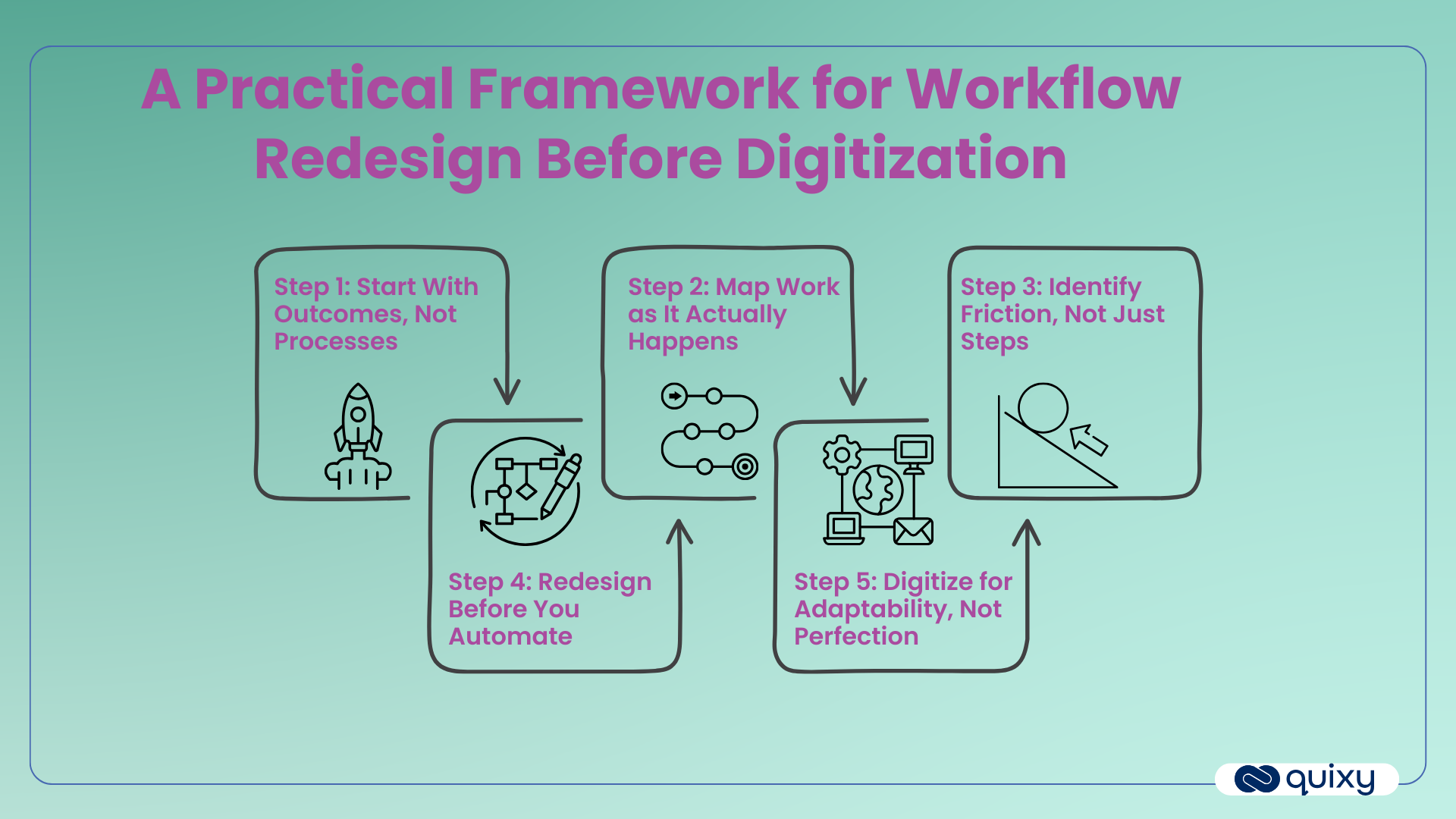
Redesigning workflows doesn’t need to be theoretical or slow. Organizations that do this well follow a clear, practical sequence.
Step 1: Start With Outcomes, Not Processes
Instead of documenting steps, start by defining success.
Ask:
- What business outcome does this workflow support?
- What does “done well” look like?
- What decision needs to happen faster, more accurately, or more consistently?
This reframes workflows as enablers of outcomes—not collections of tasks.
Step 2: Map Work as It Actually Happens
Most documented processes describe how work should happen, not how it does happen.
Effective workflow redesign captures:
- Informal steps and clarifications
- Email- and chat-based approvals
- Manual workarounds
- Handoffs and waiting time
This “work-in-the-wild” view reveals hidden complexity and shows where productivity quietly leaks every day.
Step 3: Identify Friction, Not Just Steps
The number of steps isn’t the real problem. Friction is.
Look for:
- Repeated data entry across systems
- Human memory dependencies
- Approval loops with no defined rules
- Work that exists only because systems don’t integrate
These friction points—not the process diagrams—determine how work actually feels to employees.
Step 4: Redesign Before You Automate
Only now should redesign begin.
Ask:
- Can steps be removed entirely?
- Can decisions be made rule-based instead of subjective?
- Can work be triggered by events rather than manual follow-ups?
- Can standard flows be separated from true exceptions?
The goal is clarity. Automation should reinforce good design—not compensate for poor structure.
Step 5: Digitize for Adaptability, Not Perfection
Once workflows are redesigned, digitization becomes far more effective.
The objective is not to create a “perfect” workflow. It’s to build one that can adapt as business conditions change. Regulations evolve. Teams restructure. Customer expectations shift.
Your workflows must evolve with them.
Why Traditional Enterprise Tools Block Workflow Redesign
Even when organizations understand how work should change, execution often stalls.
Traditional enterprise systems are:
- Rigid once deployed
- Dependent on IT for every modification
- Slow to respond to business change
As a result:
- Small improvements take months
- Temporary workarounds become permanent
- Teams avoid touching production workflows out of fear
Even when companies know how work should improve, they can’t act fast enough.
This gap between understanding and execution is where workflow debt continues to grow.
How No-Code Platforms Enable Continuous Workflow Redesign
To truly support workflow redesign before digitization, organizations need technology that embraces change instead of resisting it.
This is where no-code workflow platforms like Quixy fundamentally shift what’s possible.
Rather than locking workflows into rigid code, these platforms allow organizations to:
- Visually model workflows aligned to real work
- Iterate rapidly without redeployment
- Enable business-led changes with governance
- Continuously refine workflows as needs evolve
Workflows stop being static assets and become living systems—designed to improve over time.
From Automating Tasks to Orchestrating Work
The most forward-looking organizations are moving beyond isolated automation projects.
Instead of automating individual tasks, they are building orchestrated systems of work where:
- Data flows seamlessly across departments
- Decisions are embedded where work happens
- Exceptions are visible and manageable
- Change is incremental, not disruptive
This shift—from process automation to workflow orchestration—only works when workflows are redesigned first.
Without redesign, automation remains reactive. With redesign, automation becomes strategic.
Why Workflow Redesign Before Digitization Is a Leadership Imperative
Workflow redesign is not a technical concern—it’s a leadership one.
Leaders set priorities. They define outcomes. They decide whether technology is used to reinforce clarity or mask inefficiency.
Before approving the next digitization initiative, leaders should ask a simple but powerful question:
Are we digitizing how work exists today—or how it should work tomorrow?
Because technology alone doesn’t transform organizations.
Understanding and redesigning work does.
The Future Belongs to Organizations That Redesign Work First
In a world of constant change, the ability to adapt how work flows is more valuable than any single tool.
Organizations that prioritize workflow redesign before digitization don’t just move faster—they build resilience. They reduce friction, empower teams, and create systems that evolve alongside the business.
Digitization should follow understanding, not replace it.
Automation should reinforce good design, not amplify bad habits.
And before automating anything, it’s worth asking:
Does this work still deserve to exist?
Frequently Asked Questions(FAQs)
Q. Why is workflow redesign important for digital transformation?
Workflow redesign is critical because digitization amplifies existing processes. Without redesign, organizations often automate broken workflows, leading to bottlenecks, rigidity, and shadow processes—ultimately causing digital transformation initiatives to fail.
Q. What happens if companies digitize workflows without redesigning them?
When companies digitize without redesign:
1. Inefficiencies become institutionalized
2. Bottlenecks shift instead of disappearing
3. Work becomes harder to change
4. Employees create workarounds outside official systems
This results in faster chaos rather than meaningful transformation.
Q. How is workflow redesign different from process automation?
Process automation focuses on executing tasks faster using technology. Workflow redesign focuses on why work exists, how it flows, and where decisions happen. Redesign must come first so automation reinforces good design instead of compensating for poor structure.
Q. How do organizations start redesigning workflows before digitization?
Organizations can start by:
1. Defining clear business outcomes
2. Mapping work as it actually happens (including workarounds)
3. Identifying friction points and decision bottlenecks
4. Simplifying workflows before introducing automation
This approach ensures digitization supports adaptability and scale.
Q. Can workflow redesign improve employee productivity and experience?
Yes. Redesigning workflows reduces friction, clarifies ownership, eliminates unnecessary steps, and embeds decisions where work happens—leading to faster execution and a better employee experience.
Related Post



Login
Please login to comment
0 Comments
Oldest
Recent Posts







- Download the App







