

Every business reaches a breaking point with generic inventory tools. You either grow out of them, find they don’t fit your processes, or spend half your day switching between three different platforms just to get a clear picture of your stock.
There’s a better way. What if you could build an inventory management app that works exactly the way your business works — without writing a single line of code?
That’s exactly what Quixy’s no-code platform makes possible. In this guide, we’ll show you what a smart inventory management app should do, how a custom-built solution compares to off-the-shelf software, and how to get started.
The global inventory management software market is expected to hit USD 4.84 billion by 2032, with a 9.7% CAGR.
Businesses that build smarter, customized systems today will have a significant edge tomorrow
Why Generic Inventory Apps Fall Short
Most inventory apps on the market are built for the average business — which means they’re not quite right for your business. Here’s what business owners run into.
They Assume Your Processes
Off-the-shelf tools are built around generic workflows. If your receiving process, approval chains, or stock categorization doesn’t match their assumptions, you end up bending your operations to fit the software — which defeats the purpose.
They Don’t Connect Everything
You might use one app for purchase orders, another for stock tracking, and a third for generating reports. That means multiple logins, duplicate data entry, and no single source of truth. Errors creep in. Time disappears.
They Don’t Scale With You
Adding a new warehouse, new product lines, or a new team? Generic apps often require expensive upgrades or complete migrations. A custom-built app grows with you from the start.
If you want to understand the full landscape of inventory management systems before building your own, read our detailed guide on inventory management software systems.
Also Read : Supplier Relationship Management 101: Your Ultimate Winning Guide
What Is a Smart Inventory Management App?
A smart inventory management app goes beyond basic stock tracking. It uses automation, real-time data, and intelligent alerts to give business owners and operations teams complete visibility — and control — over every item in their inventory.
Here’s what separates a smart app from a basic one.
Real-Time Stock Visibility
Know exactly what’s in stock, where it is, and how fast it’s moving — across every location, at any moment. No more waiting for end-of-day counts or manual updates.
Automated Alerts and Reorders
When stock drops below a threshold you define, the system triggers an alert and can automatically initiate a reorder. You prevent stockouts without having to monitor inventory manually.
Barcode and RFID Integration
Replace manual data entry with barcode scanning or RFID tracking. This dramatically reduces human errors and speeds up receiving, picking, and counting processes.
Mobile Access
Your warehouse team shouldn’t have to walk to a desktop to check stock or update a record. A good inventory management app works on mobile, giving your team real-time capability on the floor.
Custom Workflows
Whether it’s a purchase approval chain, a quality assurance checkpoint, or a multi-location transfer process — your app should match your workflow, not the other way around.

Smart Inventory vs. Traditional Inventory: A Clear Comparison
| Feature | Smart Inventory App | Traditional Method |
| Stock Tracking | Real-time, automated with RFID/barcode | Manual counts, periodic audits |
| Order Fulfillment | Automated routing, faster and accurate | Manual, slower, higher error rate |
| Demand Forecasting | Data-driven analytics, proactive | Based on intuition or basic history |
| Scalability | Seamless across locations and systems | Difficult to scale, limited integration |
| Error Rate | Minimal — automation removes manual entry | High — human error compounds over time |
| Data Access | Centralized, real-time dashboards | Fragmented across files and systems |
What Quixy’s Platform Adds That Others Don’t
Building on Quixy gives you capabilities that go beyond what you’d get from a standard inventory app.
- No-code customization: Build exactly what you need without developers or expensive IT projects
- Automated reorder alerts: Never get caught off guard by low stock again
- ERP and CRM integration: Keep data consistent across every system in your business
- Compliance and audit trails: Digital records that make audits faster and less stressful
- Scalable architecture: Add locations, users, and workflows as your business grows
- Mobile-ready: Your team can update and access inventory data from anywhere
Want to see a full walkthrough of how these features come together? Watch our webinar on building an efficient Inventory Management System using Quixy’s List Screen.
How Quixy’s Inventory Management App Works
Quixy’s no-code platform lets you build a fully custom inventory management app — with the exact screens, workflows, and integrations your business needs. Here’s how the core components work.
Setting Up Your Inventory Foundation
Before you track a single item, you need structure. Quixy’s master screens let you configure everything from the ground up — no developers needed.
Create Your Warehouse: A warehouse in Quixy is a logical representation of your physical space. You set it up once, add your locations, and every inventory action from that point is tied to a real place in your operation. All warehouses across your organization live in one view.
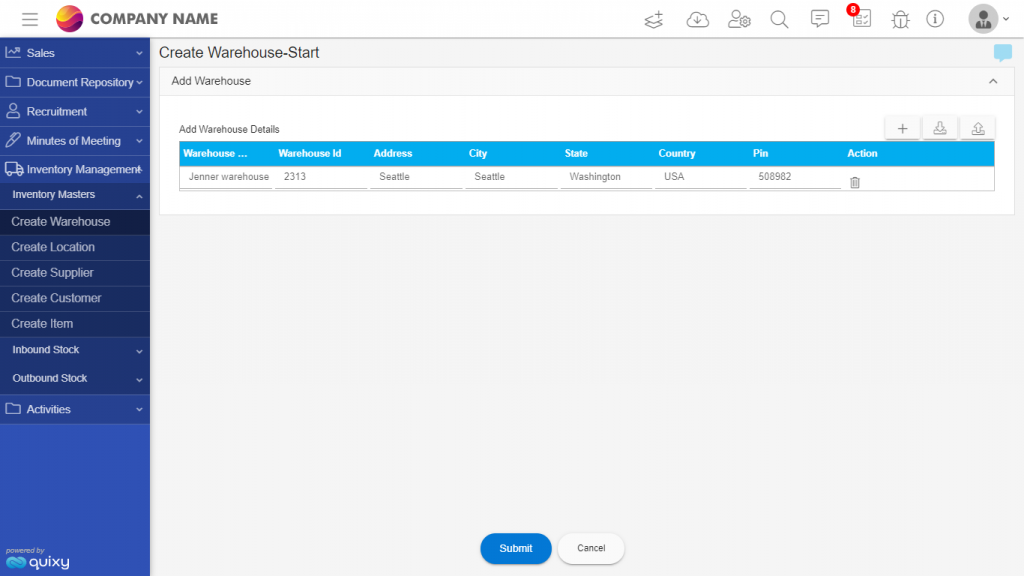
Define Locations Within Each Warehouse: Once your warehouse exists, you drill down further. Select the warehouse, enter a Rack and Bin Number, and a precise location is created. This means when someone goes to pick an item, they know exactly where to find it — no searching, no guessing.

Also Read: Your Guide to Warehouse Management Success
Item Master: Add and Locate Every Product Adding a new item to your inventory is straightforward — select the warehouse, select the location, and add the item with its details. The result is a fully traceable product record: you always know what you have, where it is, and how to find it fast.
Customer and Supplier Master: Manage all your customers and suppliers from a single screen. For businesses with large supplier lists, Quixy supports bulk data uploads via Excel — so you’re not manually adding hundreds of records one by one.
Also read: Game-Changing Logistics Software to Boost Your Supply Chain
Inward Stock: Managing Everything That Comes In
Inward stock is any inventory your business receives from suppliers. Quixy manages the entire inward process — from the moment you raise a purchase order to the moment goods hit the shelf.
Step 1 — Create a Purchase Order The inward process starts with a PO. You create it in the system, and it becomes the reference document for everything that follows — receipt, QA, and storage.

Step 2 — Quality Assurance Check When goods arrive against the PO, a QA executive inspects them before they enter your inventory. This step protects your stock quality and ensures you’re only storing what meets your standards.

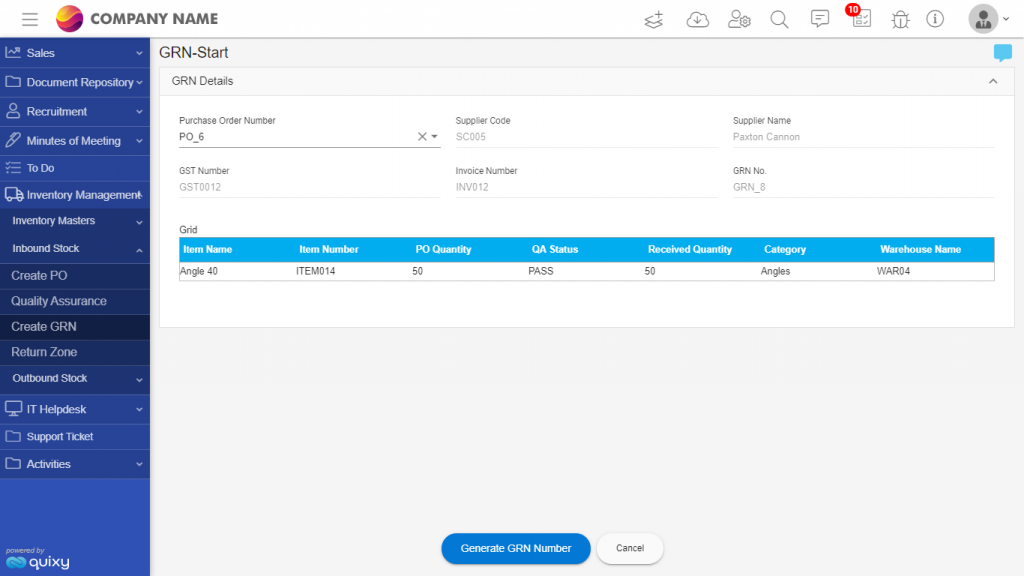
Step 3 — Generate the Good Receipt Note (GRN) Once items pass QA, a GRN is generated against the specific PO. This officially records the goods into your inventory — giving you an accurate, auditable record of exactly what came in, when, and against which order.
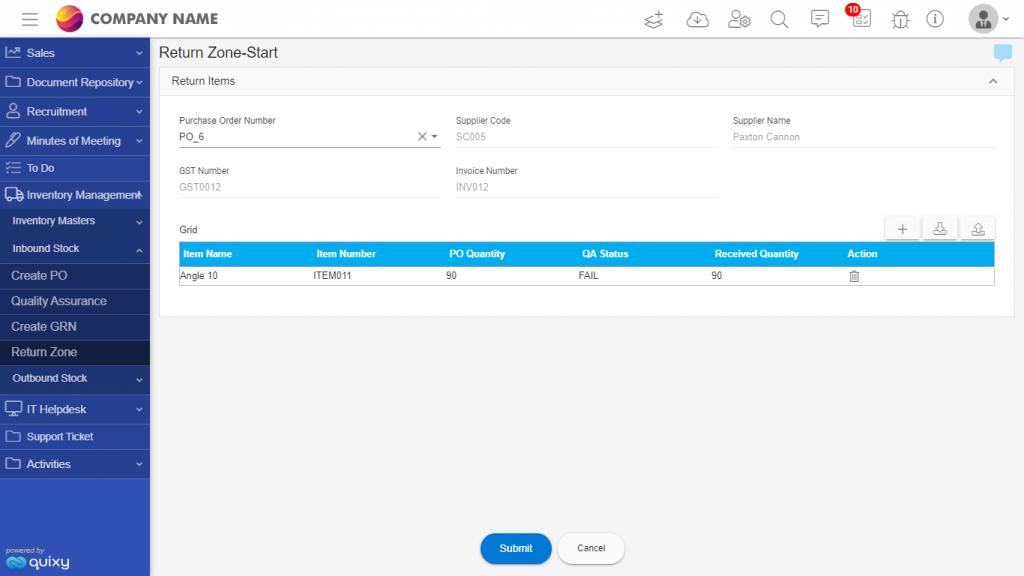
Step 4 — Handling Returns If goods fail the QA check, they don’t enter your inventory. Instead, the PO is routed to a return zone where the items are logged and sent back to the supplier. Your inventory stays clean. Your records stay accurate.
Outward Stock: Managing Everything That Goes Out
Outward stock covers everything your business sells or dispatches to customers. Quixy manages the full outward flow — from work order to delivery.
Step 1 — Create a Work Order The outward process begins when you create a Work Order linked to a specific customer. This becomes the anchor for every action that follows.

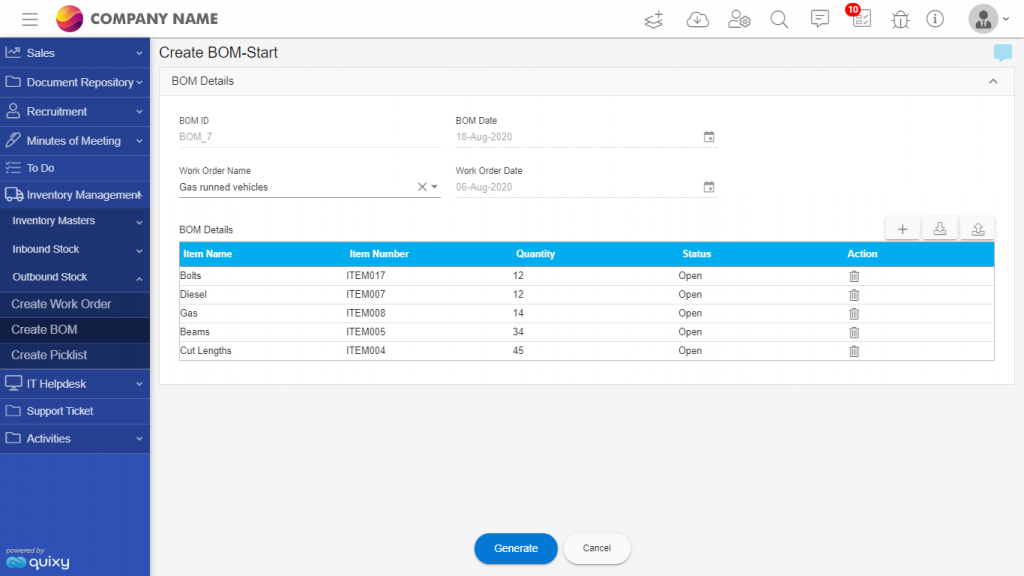
Step 2 — Build the Bill of Materials (BOM) Once the Work Order is created, you build the BOM — selecting the materials required and specifying quantities. This ensures the right items are allocated to the right order before picking begins.
Step 3 — Generate the Pick List A Pick List is automatically created showing available stock vs. required quantity for the order. Your team selects the picked quantity, confirms availability, and updates the order status — all from one screen.

Step 4 — Dispatch and Fulfillment Once picking is complete, the order moves to dispatch. Inventory levels update in real time, and the customer’s order is fulfilled accurately and on schedule.
Dashboards, Reports, and Document Generation
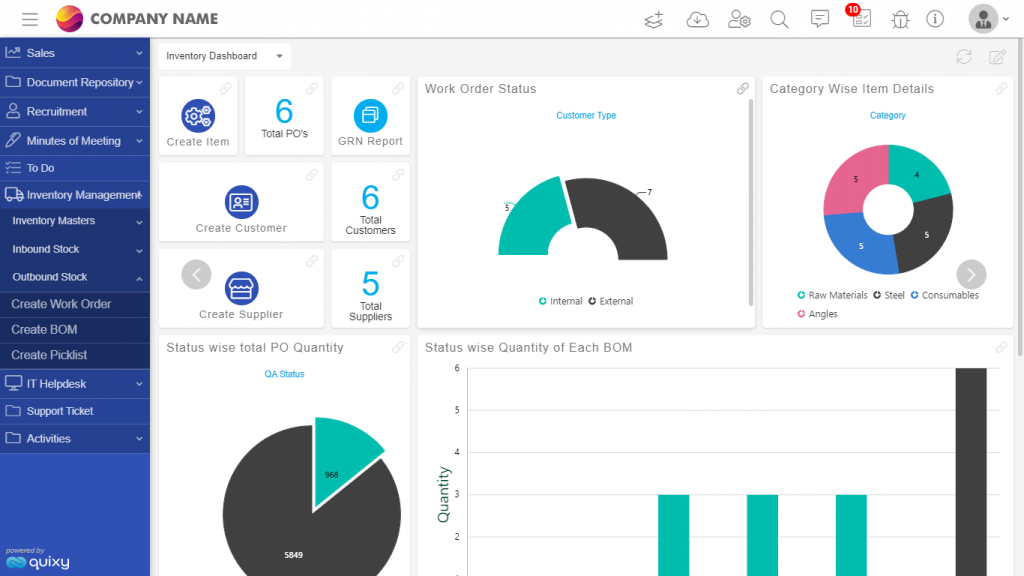
The operational value of Quixy’s inventory management app doesn’t stop at tracking — it extends to decision-making.
Real-Time Dashboard The dashboard gives you a live view of inventory levels, open Purchase Orders, and active Work Orders — all through drill-down charts you can interact with. It’s configurable by user role, so your warehouse manager sees what they need and your finance lead sees what they need — no noise, just relevant data.
Custom Reports Reports can be generated based on any criteria you define — then exported, printed, or emailed directly to stakeholders. Whether it’s a daily stock summary for your ops team or a monthly turnover report for leadership, the data is always there and always current.
Automatic Document Generation This is where Quixy goes beyond a typical inventory app. The document generator automatically creates Purchase Orders, Work Orders, Invoices, and Reports using the live data already in the system. No manual document creation. No copy-paste errors. No version confusion.
Real Results: Jatagan Security’s 50% Productivity Jump
Jatagan Security, a Sacramento-based company, was growing fast — but their manual inventory processes weren’t keeping up. Errors were common, visibility was limited, and the team was spending too much time on admin work.
After building a custom inventory management app on Quixy’s no-code platform, they automated stock tracking, order management, and stock level updates. The outcome was a 50% increase in productivity, significantly fewer errors, and a centralized system that gave leadership the data visibility they needed to make faster decisions.
50% boost in productivity. Fewer errors. Better decisions. That’s the difference a purpose-built inventory management app makes.
Also Watch: Effective Material Management Strategies for Improved Business Operations
Who Is a Custom Inventory Management App Right For?
Quixy’s no-code inventory management app is a great fit if you are:
- A business owner tired of managing inventory across multiple disconnected tools
- An operations leader who needs real-time visibility across locations
- A growing company that’s outgrown spreadsheets but doesn’t want to pay for bloated enterprise software
- A team that has unique workflows that off-the-shelf apps can’t accommodate
- A business looking to reduce manual errors and automate repetitive inventory tasks
Whether you’re in manufacturing, logistics, e-commerce, or distribution — if inventory is part of your operation, a custom-built app will serve you better than a generic one.
Also Read: Why Quixy for a Custom Warehouse Management System?
Ready to Build Your Inventory Management App?
You don’t need developers, months of implementation time, or a massive budget. With Quixy, you can have a fully functional, customized inventory management app up and running in days.
Schedule a demo today and we’ll show you exactly how to build the inventory system your business needs — built around your processes, your team, and your goals.
Frequently Asked Questions (FAQ’s)
Q. Can I monitor my inventory levels effectively with an inventory management app?
Yes, To keep track of your inventory effectively, use an inventory management app that offers real-time tracking and alerts for low stock. With Quixy, you can build customized inventory applications. So you can regularly check your inventory reports to spot trends and make intelligent decisions. Scanning barcodes can help you enter data quickly and minimize mistakes. Also, you can do regular physical counts to maintain accurate inventory records.
Q. Is an inventory management app suitable for small businesses?
Absolutely! Inventory management apps are suitable for businesses of all sizes, including small businesses. Many solutions Of Quixy are scalable and customizable, making them ideal for small operations with fewer inventory management needs and more extensive ERP for complex inventory systems.
Q. Can an inventory management app integrate with other business systems?
Many inventory management apps, such as Enterprise Resource Planning software, Customer Relationship Management systems, and e-commerce platforms, can be integrated. This allows for a streamlined flow of information across departments and enhances overall operational efficiency.
Q. Which no-code software is recommended for doing inventory?
Quixy is a no-code platform that lets users build custom apps for inventory management, featuring drag-and-drop tools, automation, real-time tracking, and robust reporting—perfect for businesses needing tailored solutions without coding.
Q. How can an inventory management app help reduce costs?
An inventory management app reduces costs by automating tasks like ensuring stock levels and avoiding overstock and stockouts. Real-time tracking and automated reordering help optimize inventory, while integration with ERP systems streamlines data and cuts administrative costs.
Related Post


Please login to comment
0 Comments
Oldest
Recent Posts







- Download the App