Managing a remote workforce is not a scaled-up version of managing people in an office. The visual cues are gone. Informal hallway conversations disappear. Assumptions about “who’s working” become unreliable. The managers who thrive in distributed environments don’t replicate the office remotely — they build entirely new operating systems for their teams.
This guide gives you that operating system: a strategy framework, a step-by-step setup process, and a practical view of how technology — specifically no-code automation — closes the gaps that traditional management tools leave open.
For WFH definitions and work model comparisons, see our WFH meaning and hybrid work guide →. For day-to-day tactical tips, see our remote workforce productivity guide →.
Nearly 62% of employers reported resistance from employees asked to return to the office. Surprisingly, only 21 per cent of those have reviewed their policies to embrace remote work.
Rather than compelling reluctant employees back, adopting remote workforce management software enables higher productivity, flexibility, and engagement.
Remote workforce management is the practice of overseeing, supporting, and optimizing employees who work outside a central office through clear policies, structured communication, outcome-based performance measurement, and the right digital infrastructure. Effective remote workforce management requires deliberate systems, not just good intentions.
This blog gives a comprehensive guide to all essential strategies to manage remote teams effectively, turning today’s work-from-anywhere culture into a sustainable and powerful asset for your organization.
What Is Remote Workforce Management?
Remote workforce management is the structured approach to leading, organizing, and supporting employees who work from locations outside a traditional office — whether from home, co-working spaces, or distributed across geographies.
It differs from traditional management in three fundamental ways:
Visibility shifts from presence to output. You cannot observe whether someone is working. You can only observe what they produce. Remote workforce management requires building systems that make outputs measurable and visible — not systems that monitor screen time or keystrokes.
Communication must be designed, not assumed. In an office, informal information flows constantly — through overheard conversations, quick desk visits, body language. Remotely, every bit of information that matters must be deliberately communicated through a defined channel. Without intentional communication design, teams fragment.
Trust is the operating system. Remote management fails when managers try to replicate physical presence through surveillance. It succeeds when trust is built through clear expectations, consistent follow-through, and an environment where employees feel supported rather than monitored.

Remote Workforce Management vs. Distributed vs. Hybrid
These terms are often used interchangeably, but they describe different operating realities:
Remote workforce: Employees work outside a central office, typically from home. The company may still have a physical headquarters.
Distributed workforce: Teams are spread across multiple geographies — different cities, countries, or time zones. Distributed management adds complexity around asynchronous work, compliance, and cultural alignment.
Hybrid workforce: Employees split time between remote locations and an office. Hybrid management adds the challenge of ensuring remote employees are not disadvantaged relative to in-office colleagues.
Each requires a different management emphasis. This guide focuses primarily on remote and distributed teams, with hybrid considerations noted where relevant.
Also Read: Why Choose Quixy as Your Business Process Management Software?
Why Remote Workforce Management Is a Critical Business Competency in 2026
Remote work is no longer a temporary arrangement or an employee perk. As of 2025, 67% of companies offer either fully remote or hybrid work arrangements, while only 33% require full-time office presence (Flex Index via Upwork). Remote workers save an average of 55 minutes every day by eliminating commutes — time that largely goes back into focused work.
The productivity argument for remote work is well-established. Remote employees operate at 20–25% higher productivity on average compared to their in-office counterparts, largely due to fewer interruptions, no commute fatigue, and more control over their environment. Companies that enable remote work save over $11,000 per employee annually through reduced real estate and infrastructure costs (Global Workplace Analytics).
But the management challenge is real. Only 25% of managers are rated as effective at managing distributed teams, according to a survey of 900 HR, IT, and product leaders (TechSmith). The gap between the promise of remote work and its execution almost always comes down to management systems, not employee willingness.
Organizations that build deliberate remote workforce management capabilities gain a structural competitive advantage: they attract talent that won’t relocate, retain employees who value flexibility, and build operations that function regardless of physical disruption.
The 5 Core Challenges of Remote Workforce Management
Answering the challenges of remote workforce management is very important. Regular employee engagement helps sustain the workforce’s productivity tools and employee growth. Here are five key obstacles and how they affect remote teams.
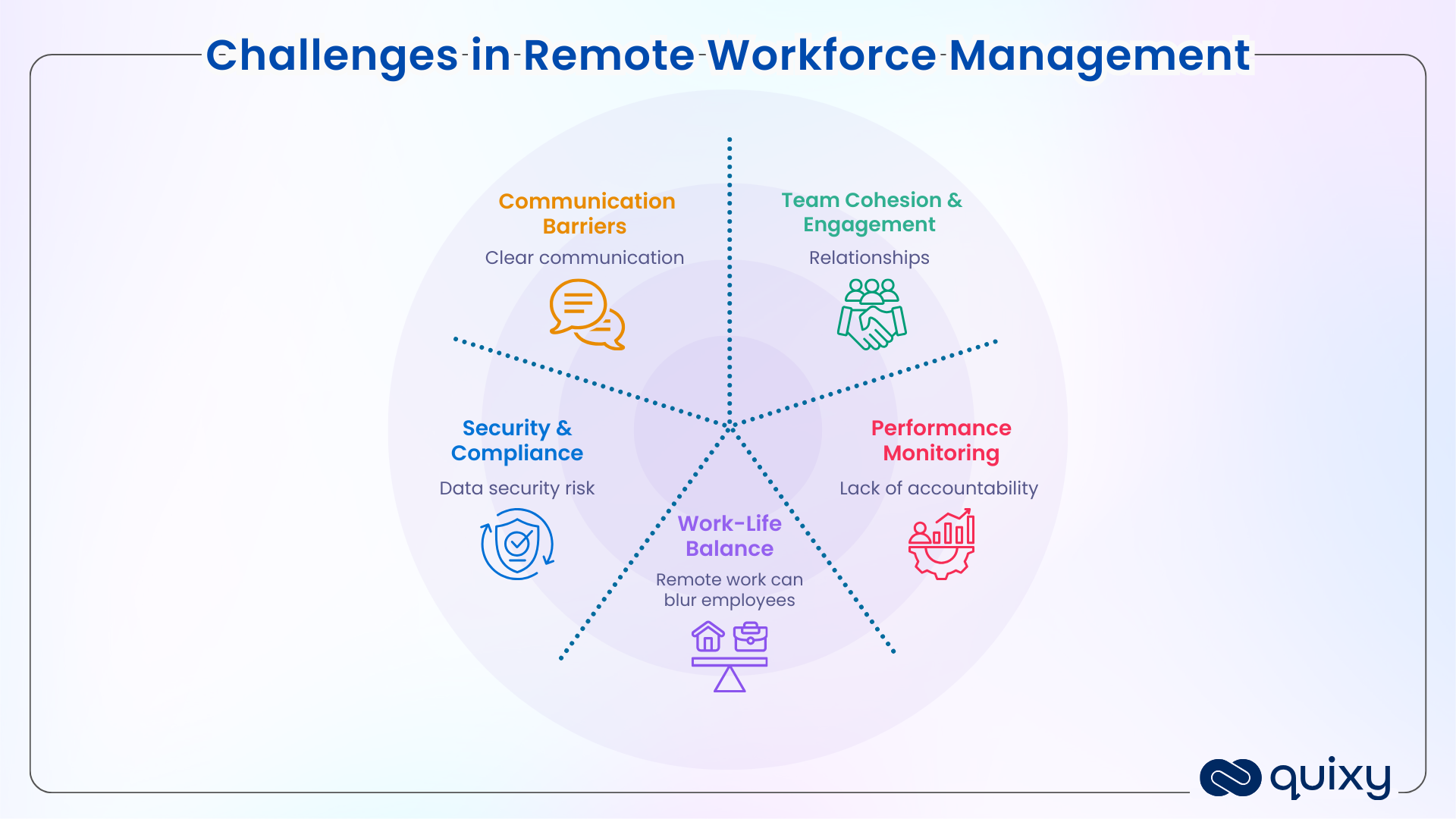
Understanding the obstacles is not an excuse for them. It’s the starting point for designing systems that remove them.
1. Communication Gaps and Async Coordination
When everyone is in the same timezone and the same building, synchronous communication is cheap. Remotely — especially across time zones — synchronous communication becomes expensive and often impossible. Teams that default to “let’s jump on a call” for every decision slow down, exhaust their members, and create invisible bottlenecks.
The fix is not more meetings. It is building async rhythms: documenting decisions, creating structured update channels, and using tools that give everyone context without requiring simultaneous availability.
2. Performance Visibility Without Micromanagement
Remote managers struggle with a specific tension: they can’t observe work happening, but they still need confidence that work is progressing. Many resolve this by monitoring — tracking login times, taking screenshots, counting messages. This damages trust, reduces autonomy, and consistently leads to lower performance and higher attrition.
The right resolution is outcome visibility, not activity monitoring. When expectations are defined as deliverables with deadlines, and when the right systems surface task status in real time, managers see exactly what they need without surveilling how people spend their hours.
3. Maintaining Team Cohesion and Culture
Remote teams lose the informal social infrastructure that offices provide: coffee conversations, shared lunches, visible celebrations. Without deliberate substitutes, team cohesion erodes. Employees feel isolated, engagement drops, and turnover rises.
This requires intentional culture investment — structured social touchpoints, explicit recognition systems, and leadership behavior that models connection in digital spaces.
4. Cybersecurity and Data Compliance
When employees work from multiple locations on multiple devices — often on home networks that are not corporate-managed — the attack surface for security breaches expands significantly. For regulated industries, remote work also introduces compliance complexity around data residency, access controls, and audit trails.
Remote workforce management must include a security posture: VPNs or zero-trust access, endpoint management policies, data classification rules, and regular security training for all remote employees.
5. Onboarding and Training Remote Employees Effectively
Onboarding a new employee remotely is one of the highest-risk moments in the employee lifecycle. Without structured digital workflows, new hires miss equipment setups, skip policy briefings, fail to connect with key colleagues, and often feel lost by the end of their first week. The downstream impact — slower time-to-productivity, lower engagement, higher early attrition — is directly traceable to weak remote onboarding.
Structured, automated onboarding workflows are not a nice-to-have for remote teams. They are a management essential.
Building a Remote Workforce Strategy: A Step-by-Step Framework
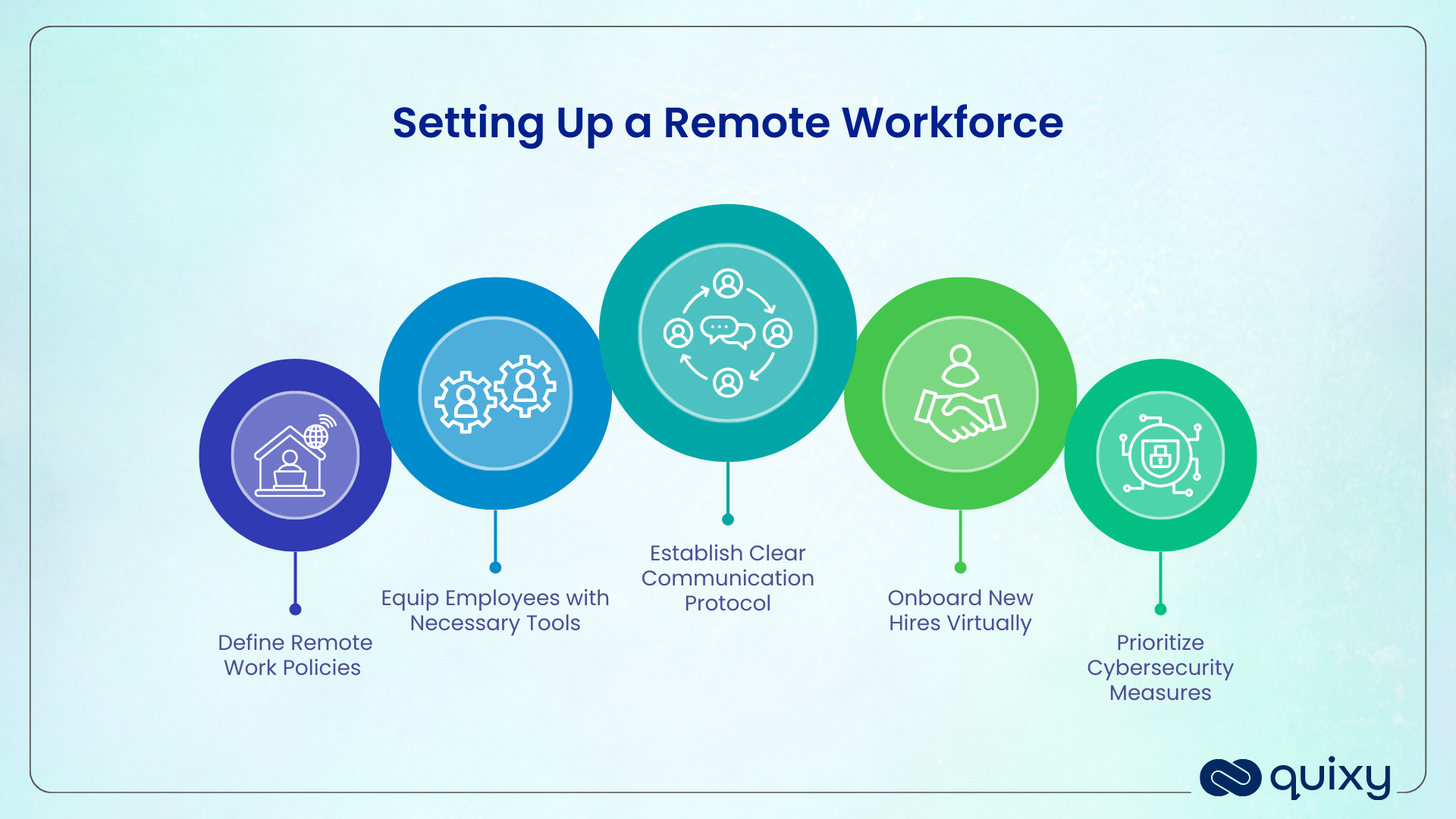
Step 1 — Define Your Remote Work Policy
Every remote workforce needs a written policy that removes ambiguity. Without it, managers make inconsistent decisions, employees have unequal experiences, and the company carries unnecessary legal and operational risk.
Your remote work policy should cover: who is eligible for remote work, expected working hours and availability windows, communication response time expectations, equipment provision and reimbursement, data security requirements for remote devices and home networks, and performance measurement criteria.
The policy is not a punitive document. It is the shared agreement that enables distributed teams to operate with consistent expectations and genuine autonomy.
Step 2 — Set Up Your Technology Stack
Remote teams need four categories of technology to function:
Communication tools — for synchronous meetings (Zoom, Microsoft Teams) and asynchronous messaging (Slack, Teams channels). The key decision is which channel carries which type of information — and enforcing that discipline.
Task and project management — a single source of truth for what is being worked on, by whom, and by when. Spreadsheets do not scale. A dedicated platform does.
Document and knowledge management — a searchable repository where decisions, processes, and institutional knowledge live. Without this, remote teams continuously recreate context that should already exist.
Workflow automation — the infrastructure that keeps processes moving without manual coordination. This is the layer that most remote teams underinvest in, and the one that creates the most leverage. More on this below.
Step 3 — Establish Communication Protocols and Async Rhythms
Design your communication before it happens. Specify:
- Which decisions are made asynchronously (in writing, in documented channels) versus synchronously (in meetings)
- When the team has core hours for overlap — especially critical for distributed teams across time zones
- What cadence of structured check-ins exists (1:1s, team stand-ups, project reviews) and what they cover
- What the expectation is for response time by channel (e.g., Slack within 4 hours, email within 24 hours)
- How information from meetings is documented and shared with those who couldn’t attend
The documentation-first mindset is the single most important cultural shift for distributed teams. Decisions that aren’t written down don’t exist for remote employees who weren’t in the room.
Step 4 — Define Performance Metrics Based on Outcomes, Not Hours
Remote management requires a fundamental shift in how performance is measured. Hours spent working are not observable and not meaningful. Outcomes are both.
For every role and every project, define: what does good look like at the end of the week, the month, the quarter? What are the specific deliverables, quality standards, and deadlines? How will progress be tracked visibly, so neither the manager nor the employee is in the dark?
When expectations are this clear, the question of “is she actually working?” dissolves. Either the deliverables are being met or they’re not — and that conversation is productive in either direction.
Step 5 — Build a Remote Onboarding and Training Process
Remote onboarding must be structured as a workflow, not a checklist that lives in someone’s email. Every new hire needs: equipment provisioning confirmed before Day 1, account access set up before Day 1, a structured schedule for the first two weeks that includes product/process learning and colleague introductions, a formal 30-day and 90-day check-in with their manager, and a clear point of contact for every category of question.
This workflow should run automatically — triggered the moment an offer is accepted. No HR team should be manually coordinating 15 simultaneous onboarding processes across different locations.
Essential Tools for Remote Workforce Management
Remote workforce management requires a deliberate tool stack. Rather than reviewing individual tools here — which you can find in our best remote working tools guide → and our workforce management software comparison → — this section covers the categories and what to look for in each.
Communication platforms should support both synchronous and asynchronous modes, integrate with your task management tools, and have strong search so context is always findable.
Task and project management systems should give every team member real-time visibility into what’s assigned, what’s in progress, and what’s blocked — without requiring manual status updates.
Workforce automation platforms should allow managers to automate repetitive coordination tasks: escalation reminders, status notifications, approval routing, and reporting. This is the category most remote teams underestimate until they’ve lost weeks to manual overhead.
Security and compliance tools should include endpoint protection, zero-trust access controls, and audit logging — particularly important for distributed teams accessing sensitive data across multiple networks.
How No-Code Automation Transforms Remote Workforce Management
The single biggest operational gap in remote workforce management is the manual coordination overhead that accumulates when there are no automated systems holding processes together.
In an office, informal coordination happens constantly and invisibly. Remotely, that coordination has to happen through deliberate action — and if it isn’t automated, it falls on managers and HR teams to do manually. The result: hours spent chasing status updates, following up on approvals, reminding employees about outstanding tasks, and compiling reports that should generate themselves.
No-code automation platforms remove that overhead without requiring a development team or a lengthy IT project.
Automating Remote Onboarding Workflows
Instead of an HR manager manually emailing IT about laptop provisioning, emailing the hiring manager about a Day 1 schedule, and checking in weekly to see if steps were completed — a Quixy onboarding workflow does all of this automatically. Tasks are assigned to the right people at the right time. Deadlines trigger reminders. Escalations fire if steps are missed. The HR team sees the real-time status of every active onboarding across every location on a single dashboard.
Task Assignment and Escalation Without Manual Oversight
Remote managers cannot walk over to a team member’s desk to check on a task. Quixy’s workflow automation creates a digital equivalent: tasks are assigned based on rules, deadlines trigger automated reminders to assignees, and missed SLAs escalate to supervisors automatically — without a single manual follow-up email.
Real-Time Dashboards for Distributed Team Visibility
The question every remote manager asks at the start of the week — “what is actually happening across my team?” — should be answerable in seconds, not after a round of status update requests. Quixy’s custom dashboards surface exactly this: task completion rates, overdue items, workload distribution, project progress, and team-level KPIs — all updated in real time.
Building Custom Workflows for Any Remote Process
Quixy’s no-code platform allows operations and HR teams to build the specific workflows their remote operations require — without being limited to what an off-the-shelf tool supports. Leave requests, expense approvals, incident reports, compliance checklists, training completions, equipment requests — any process that currently lives in email or a spreadsheet can be turned into a structured, automated, visible workflow in days.
Remote Workforce Management Best Practices
These practices reflect what consistently high-performing distributed teams do differently from teams that struggle.
Trust is earned through systems, not faith. The most effective remote managers build trust by making expectations and progress transparent — not by monitoring activity. When both the manager and the employee have access to the same real-time view of task status, the trust question resolves itself.
Default to writing, not meetings. Decisions, updates, and context should live in writing first. Meetings should be for discussion and alignment, not information transfer. A team that documents well needs fewer meetings and produces better institutional knowledge.
Standardize the non-negotiables, flex everything else. Remote work policies work best when they set firm expectations on outcomes, availability windows, and security requirements — and give employees full autonomy over everything else (when they work within those windows, how they structure their days, where they work from).
Invest in connection before it’s needed. Social capital in remote teams is harder to build and faster to erode than in offices. Regular structured connection moments — virtual team lunches, casual Slack channels, peer recognition systems — should be built into the operating rhythm before engagement drops.
Audit your tools quarterly. Tool sprawl is one of the most common remote management failure modes. When teams use five platforms that partially overlap, context fragments, work gets lost, and onboarding new members becomes unnecessarily complex. Periodically assess whether your stack is coherent and consolidated.
Build feedback loops into your management cadence. Remote employees experience the quality of management differently than in-person employees. Regular, structured opportunities to surface concerns — anonymous pulse surveys, skip-level check-ins, team retrospectives — give managers early warning signals before disengagement becomes attrition.
Also Read: Learning Made Easy with No-Code Employee Training Management Software
Measuring Remote Workforce Performance
The Right KPIs for Remote Teams
Performance metrics for remote teams should focus on outputs and outcomes, never on activity proxies like hours logged or messages sent. Useful KPIs include: task completion rate against deadlines, quality scores on deliverables, project milestone achievement, response time within defined SLA windows, and self-reported productivity and engagement (via pulse surveys).
These metrics should be visible to both managers and employees — transparency is the foundation of accountability in remote environments.
Tools for Monitoring Without Micromanaging
The distinction between monitoring and micromanaging is the unit of measurement. Monitoring task and project completion at the outcome level is legitimate management. Monitoring keystroke frequency, application usage, or screenshot intervals is micromanagement — and research consistently shows it reduces performance and trust without improving output quality.
The right monitoring infrastructure is a task management system and a reporting dashboard that surface outcome data in real time. If a manager needs more than that to feel confident in their team’s performance, the gap is in expectation-setting and role clarity, not in surveillance capability.
Also Read: Streamlining Document Management with an Efficient File Management System
The Future of Remote Workforce Management
Remote workforce management is evolving rapidly across three dimensions.
Async-first cultures are becoming the competitive standard. Organizations that build documentation-first, meeting-light operating models attract and retain top distributed talent. By 2026, teams that default to synchronous communication as the primary coordination mode are at a structural disadvantage in competitive talent markets.
AI is entering the management layer. AI tools are beginning to surface insights that previously required a manager’s judgment — workload imbalance detection, early attrition risk signals, productivity pattern analysis. These tools augment good managers; they don’t replace the need for deliberate management design.
Global compliance is becoming more complex, not less. As remote workforces span multiple countries, the legal, tax, and data compliance landscape continues to develop. Organizations that treat remote workforce compliance as an afterthought face growing risk exposure. Building compliance-aware workflows — with audit trails, access controls, and regulatory documentation — is becoming a management requirement, not an IT project.
Build the Remote Workforce Management System Your Team Actually Needs
Remote workforce management fails when it’s built on assumptions. It succeeds when it’s built on deliberate systems — clear policies, visible processes, structured communication, and automation that removes the manual overhead that slows distributed teams down.
Quixy’s no-code platform helps operations and HR teams build the specific workflows their remote operations require — without waiting for IT, without being limited by off-the-shelf templates, and without re-platforming every time the business changes.
👉 Schedule a Demo → 👉 Explore Quixy for HR Teams → 👉 See the Best Remote Working Tools →
Frequently Asked Questions ( FAQ’s )
Q. How does no-code automation help remote workforce management?
No-code automation removes manual coordination overhead from remote operations — automating onboarding task sequences, escalation reminders, approval routing, and real-time reporting. Platforms like Quixy allow HR and operations teams to build these workflows without developer resources, deploying them in days rather than months.
Q. What is the difference between remote work and hybrid work management?
Remote work management focuses on fully distributed teams. Hybrid work management adds the complexity of ensuring equity between remote and in-office employees — equal access to information, opportunities, and visibility.
Q. What tools are essential for remote workforce management?
The essential categories are: communication platforms (synchronous and asynchronous), task and project management systems, document and knowledge management repositories, and workflow automation tools. The specific tools depend on team size, industry, and process complexity. See our full remote working tools guide →.
Q. How do you measure productivity in a remote workforce?
Measure outcomes, not activity. Define clear deliverables, deadlines, and quality standards for every role. Use a task management system that surfaces completion status in real time. Run regular structured check-ins focused on blockers and progress — not activity reports.
Related Post



Please login to comment
0 Comments
Oldest
Recent Posts







- Download the App