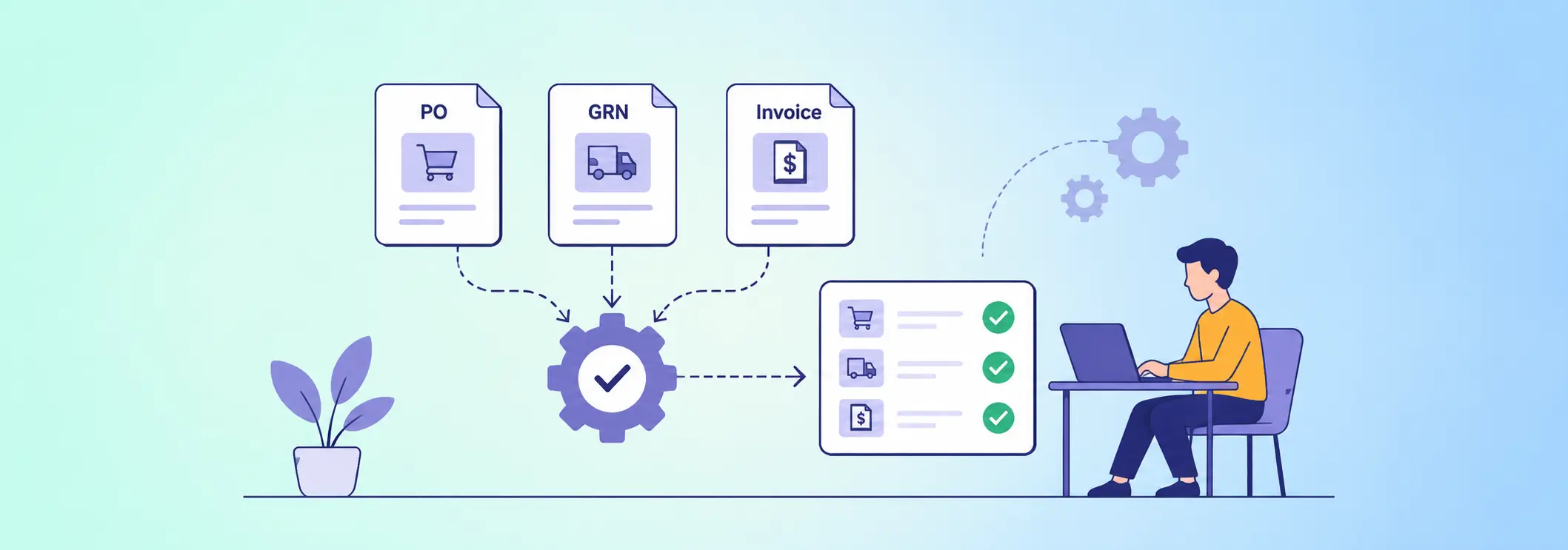

Three-way matching is the process of verifying a supplier invoice against a purchase order (PO) and a goods receipt note (GRN) before approving payment. 3-way matching automation applies predefined rules to compare quantities, prices, supplier details, and received goods, helping finance and procurement teams identify discrepancies without manually checking every document.
For businesses processing hundreds or thousands of supplier invoices, manual reconciliation can delay payments, increase the risk of duplicate or incorrect payments, and create avoidable work between procurement, warehouse, and finance teams. A structured automated workflow can validate documents, route exceptions to the right person, and maintain an auditable record of each decision.
The objective is not simply to digitize paperwork. It is to establish a reliable process that ensures the business pays for what it ordered and actually received.
This guide explains how three-document reconciliation works, which rules to automate, how to handle exceptions, and how to build the process without writing code.
What Is Three-Way Matching in Accounts Payable?
Three-way matching is an internal financial control used to verify that a supplier’s invoice agrees with the original purchase order and the goods or services received.
Each document serves a different purpose:
- Purchase order (PO): Records what the business authorized for purchase, including supplier details, quantities, agreed prices, and terms.
- Goods receipt note (GRN): Records what the warehouse or receiving team actually received and accepted.
- Supplier invoice: States what the supplier expects the business to pay.
A payment should proceed only when the documents satisfy the organization’s matching rules and approval requirements.
For example, a company orders 100 components at $20 each. The warehouse records 100 accepted components, and the supplier invoices the company for $2,000. If the supplier, quantity, price, and applicable terms agree, the invoice can move to approval.
However, if the supplier invoices for 110 components, the workflow should flag the quantity difference instead of automatically approving the full amount.
This control is particularly useful for manufacturers, distributors, retailers, construction companies, and other organizations managing frequent supplier purchases.
Why Manual PO, GRN, and Invoice Reconciliation Breaks Down
Manual reconciliation often relies on spreadsheets, email attachments, ERP screens, and individual employees remembering the next step. These methods become difficult to manage as transaction volumes and supplier relationships grow.
Common problems include:
- Quantity discrepancies: The invoice includes more items than the receiving team accepted.
- Price differences: The supplier charges a different unit price from the approved purchase order.
- Missing documents: An invoice arrives before the GRN is recorded or approved.
- Duplicate invoices: The same invoice is submitted more than once or entered through different channels.
- Approval delays: Finance employees spend time chasing warehouse teams, buyers, and managers.
- Weak audit trails: Supporting documents, exception explanations, and approval decisions are scattered across systems.
These problems are not always caused by employee mistakes. They can also result from disconnected systems, inconsistent supplier data, unclear approval rules, or poorly defined receiving procedures.
Automating the reconciliation process helps establish consistent checks and makes outstanding exceptions visible before they affect payment schedules.
How Does Automated Three-Document Matching Work?
A reliable workflow follows a defined sequence from invoice receipt to payment authorization.
1. Capture the supplier invoice
The workflow begins when a supplier invoice is uploaded, submitted through a portal, or received through an integrated system.
Document extraction technology can identify the invoice number, supplier, purchase order reference, invoice date, quantities, unit prices, taxes, and total amount.
Extracted information should be validated before it is used. If a field is missing or the document cannot be read reliably, the workflow should request review rather than assume the value is correct.
2. Retrieve the corresponding purchase order
The system locates the approved PO using its reference number and verifies that the supplier and relevant line items correspond to the invoice.
It checks whether the purchase order is valid, whether the items were authorized, and whether the invoiced prices fall within the permitted limits.
3. Retrieve the goods receipt note
The workflow checks the GRN or equivalent receiving record to establish how much merchandise was actually received and accepted.
For partial deliveries, the received quantity may be lower than the original order. The workflow must therefore distinguish between goods ordered, goods received, and goods invoiced.
4. Apply the matching rules
The workflow compares the relevant fields across all three documents. Exact matches can proceed automatically when all required controls are satisfied.
Differences are routed for investigation according to their type and severity.
5. Route the invoice for approval
Invoices that pass matching are sent to the appropriate approver or finance process. Exceptions go to the buyer, receiving team, or accounts payable specialist responsible for resolving them.
6. Record the outcome
The workflow records the match result, supporting documents, exceptions, reviewer actions, and final approval status. Once authorized, the invoice can be transferred to the accounting or ERP system for payment processing.
This separation between matching and payment authorization is essential: a successful match should not bypass required financial approvals.
Which Matching Rules Should You Automate?
The quality of an automated workflow depends on the rules behind it. Simply comparing document totals is insufficient because different discrepancies require different responses.
| Matching check | What the workflow compares | Recommended action |
| Supplier validation | Supplier identity across the PO and invoice | Flag mismatched supplier details |
| PO reference | Invoice reference against the approved PO | Route missing or invalid references for review |
| Quantity validation | Ordered, received, and invoiced quantities | Flag excess quantities or unsupported billing |
| Unit price | Agreed PO price against the invoice price | Apply approved tolerance limits |
| Total amount | Expected amount against the invoiced amount | Investigate unexplained differences |
| Duplicate detection | Invoice number, supplier, and other identifying fields | Block or review potential duplicates |
| Receipt status | Accepted quantities recorded in the GRN | Hold invoices with missing or unapproved receipts |
| Tax and terms | Applicable tax, discounts, and payment terms | Validate against configured policies |
Tolerance rules deserve particular attention. Some organizations permit small price differences caused by rounding or agreed commercial terms. Others require exact matches.
For instance, an organization might allow a 1% price variance for specified categories but require zero tolerance for unauthorized quantity differences. These are illustrative settings, not universal standards; each business should define and approve its own limits.
The workflow should also support line-level matching. An invoice can contain several products, and one line may match while another does not. Treating the entire invoice as a single total can hide these differences.
How to Implement Three-Way Matching Without Code
3-way matching automation can be implemented through configurable forms, workflow rules, integrations, and approval paths rather than a custom-coded application.
The following approach works well for organizations that want to automate a defined reconciliation process without replacing their entire finance system.
Step 1: Map the existing reconciliation process
Document how invoices currently move from receipt to payment. Identify who creates purchase orders, who records goods received, who investigates discrepancies, and who authorizes payments.
Record baseline metrics such as average processing time, exception rates, overdue approvals, and duplicate submissions.
Step 2: Standardize document fields
Define the information that must be available in each record. Typical fields include supplier ID, PO number, item code, ordered quantity, received quantity, invoiced quantity, unit price, tax, and invoice number.
Consistent identifiers are critical. If the supplier uses one product code and the warehouse uses another, matching will require an approved mapping or a human review.
Step 3: Configure the workflow and matching conditions
Use a visual workflow builder to define the sequence of actions and conditions.
For example:
- If the supplier and PO match, retrieve the receiving record.
- If the received quantity supports the invoice quantity, continue validation.
- If all mandatory checks pass, route the invoice for approval.
- If any check fails, create an exception task and notify the responsible employee.
This is where no-code workflow automation can help business teams configure and adjust process logic without building a new application from scratch.
Step 4: Connect existing business systems
Determine where purchase orders, receiving records, supplier details, and invoices are stored. The workflow may need to connect to an ERP, accounting platform, procurement application, document repository, or supplier portal.
Choose integrations that preserve reliable record identifiers and prevent duplicate updates. If a system cannot provide the necessary data automatically, establish a controlled upload or review step.
Step 5: Test real-world scenarios
Test the workflow using both successful matches and problematic transactions.
Include partial deliveries, split invoices, changed purchase orders, missing GRNs, price differences, duplicate invoice submissions, and rejected goods.
Verify that each scenario produces the expected status, notification, and approval route before deploying the workflow to production.
Step 6: Monitor performance and refine the rules
Review exception volumes, processing times, false matches, overdue tasks, and manual interventions. Adjust the workflow when recurring issues reveal unclear rules or inconsistent data.
Start with a defined supplier group or transaction category, validate the results, and expand gradually.
What Does the Research Say About Finance and Procurement Automation?
The opportunity extends beyond invoice entry. Automation can support repeatable activities throughout purchasing, receiving, reconciliation, and financial control.
McKinsey’s research on digitizing source-to-pay found that almost 60% of the activities in the source-to-pay process had the potential to be fully or largely automated using technologies available at the time of the research. This is an estimate of automation potential across the broader process, not a prediction that every organization can automate 60% of its invoices.
More recent evidence also illustrates the adoption of automation in finance operations. APQC’s 2025 research reports that 53% of surveyed organizations had implemented automation in procure-to-pay, counting organizations that were implementing, operating, or operating automation at scale. This measures organizational adoption, not the percentage of transactions automatically matched.
Together, these findings support a practical takeaway: organizations should target high-volume, rule-based activities first and measure actual improvements rather than assume automation will eliminate every manual step.
Automated vs. Manual Three-Way Matching: What Is the Difference?
The main difference is how consistently documents are checked, how quickly exceptions reach the right person, and how easily teams can trace the final decision.
| Evaluation criterion | Manual reconciliation | Automated workflow |
| Document comparison | Employees compare records individually | Configured rules compare available data |
| Processing consistency | Depends on individual practices | Applies the same rules to each transaction |
| Exception handling | Often discovered during manual review | Can flag differences and route them automatically |
| Approval follow-ups | Relies on emails and reminders | Uses task assignments, notifications, and escalations |
| Auditability | Evidence may be spread across files and emails | Decisions and supporting records can be centralized |
| Handling unusual cases | Employees investigate manually | Exceptions are routed to designated reviewers |
| Scalability | Additional volume can increase administrative work | Rules and workflows can handle higher volumes, subject to system capacity |
Automation does not remove the need for controls or human judgment. It makes routine verification more consistent while directing employees toward transactions that require attention.
Where AI and Workflow Automation Fit Into the Process
Rules-based matching is often sufficient when documents contain structured data and the business has clear policies. AI can add value when information arrives in inconsistent formats or requires interpretation.
Examples of AI Automation Examples include extracting fields from scanned invoices, identifying potential duplicate submissions, classifying discrepancy reasons, and suggesting the correct purchase order when a reference is incomplete.
AI Workflow Automation can combine these capabilities with business rules to direct work, generate exception summaries, and notify the right team. However, AI-generated values and recommendations should be validated before they affect financial records.
When evaluating Workflow Automation Software, look for configurable matching rules, role-based permissions, integration options, exception queues, audit trails, and reporting. Broader Supply Chain Automation initiatives can connect these controls with receiving, inventory, procurement, and supplier operations.
The underlying Process Automation Technology should support reliable data exchange and clear accountability, rather than simply moving documents between departments.
For businesses considering a configurable platform, Quixy is one example of a no-code environment that can be used to build business workflows. The appropriate solution depends on the organization’s existing systems, security requirements, transaction volumes, and integration needs.
How to Measure the ROI of Invoice Matching Automation
A successful implementation should produce measurable operational improvements without weakening financial controls.
Track these metrics before and after deployment:
- Average invoice processing time: Measure the elapsed time between invoice receipt and approval.
- First-pass match rate: Calculate the percentage of invoices that pass all matching rules without manual correction.
- Exception resolution time: Measure how long discrepancies remain unresolved.
- Cost per invoice: Include employee effort, rework, and relevant technology costs.
- Duplicate and incorrect payment incidents: Monitor whether payment-related control failures decrease.
- On-time payment rate: Check whether faster processing helps the business meet approved payment terms.
Calculate ROI using actual baseline data. Include implementation, integration, maintenance, and training costs, as well as time saved and avoided rework. A high automatic-match rate is useful only if the matches are accurate and the necessary approval controls remain effective.
Conclusion
Three-way reconciliation is an important control between procurement, receiving, and accounts payable. When purchase orders, GRNs, and supplier invoices are checked manually, missing records, price differences, and approval delays can create unnecessary work and payment risk.
A well-designed automated workflow applies consistent matching rules, identifies discrepancies early, routes exceptions to the right people, and maintains a traceable approval history. Businesses can begin with a focused process, connect their existing systems, and expand after validating the results.
The most effective approach is not to automate every decision indiscriminately. It is to automate predictable checks, preserve human oversight for exceptions, and measure whether the process becomes faster, more accurate, and easier to audit.
Frequently Asked Questions(FAQ’s)
1. What is three-way matching in accounts payable?
Three-way matching verifies a supplier invoice against the purchase order and goods receipt note before payment approval. It checks whether the business ordered the items, received the relevant goods, and was billed according to the agreed terms.
2. Can three-way matching be automated without coding?
Yes. A configurable workflow can compare document fields, apply tolerance rules, route exceptions, send notifications, and maintain approval records without requiring a custom-coded application. Reliable source data and appropriate system integrations are still necessary.
3. What happens when a PO, GRN, and invoice do not match?
The workflow flags the discrepancy and routes it to the responsible buyer, receiving employee, or accounts payable reviewer. The invoice remains on hold until the difference is investigated and resolved under the organization’s approval policy.
4. What is the difference between two-way and three-way matching?
Two-way matching compares the purchase order with the supplier invoice. Three-way matching adds the goods receipt note, allowing the business to verify that the invoiced quantity is supported by the goods actually received.
5. What should businesses look for in invoice matching automation software?
Look for configurable matching rules, line-level validation, duplicate detection, exception management, ERP or accounting integrations, role-based access, audit trails, and reporting. The solution should support partial deliveries and legitimate exceptions without automatically approving unsupported invoices.



Recent Posts




- Download the App