
There’s a particular kind of frustration that most operations managers know well. Building internal apps for operations managers shouldn’t require a software development team — you need a simple tool to track vendor renewals, route a purchase approval, or let facility teams log maintenance issues without calling someone. But raising an IT ticket means joining a queue, waiting through sprint cycles, and eventually receiving something that took three months and doesn’t quite match what you originally described.
Meanwhile, the team is still tracking vendor contracts in a shared spreadsheet, approvals are still happening over email, and someone is still manually chasing follow-ups every Monday morning.
72% of IT leaders say project backlogs prevent them from working on strategic priorities
Forrester
This is the operational reality for most enterprise teams — not because the work is technically complex, but because the path between “we need a small internal tool” and “we have a small internal tool” runs directly through IT’s backlog. And IT, understandably, has larger infrastructure priorities than building a tracker for the facilities team.
Citizen development changes that path. Not by removing IT from the picture entirely — governance, security, and system integrations still belong to IT — but by letting operations managers build the small, practical internal apps their teams need without requiring developer time for every one of them. And for operations teams specifically, it’s less a trend than a practical answer to a problem that hasn’t changed in years.

Here are seven internal apps operations managers can realistically build without raising a single IT ticket.
Why Operations Teams Are Trapped in IT Queues for Tools They Could Build Themselves
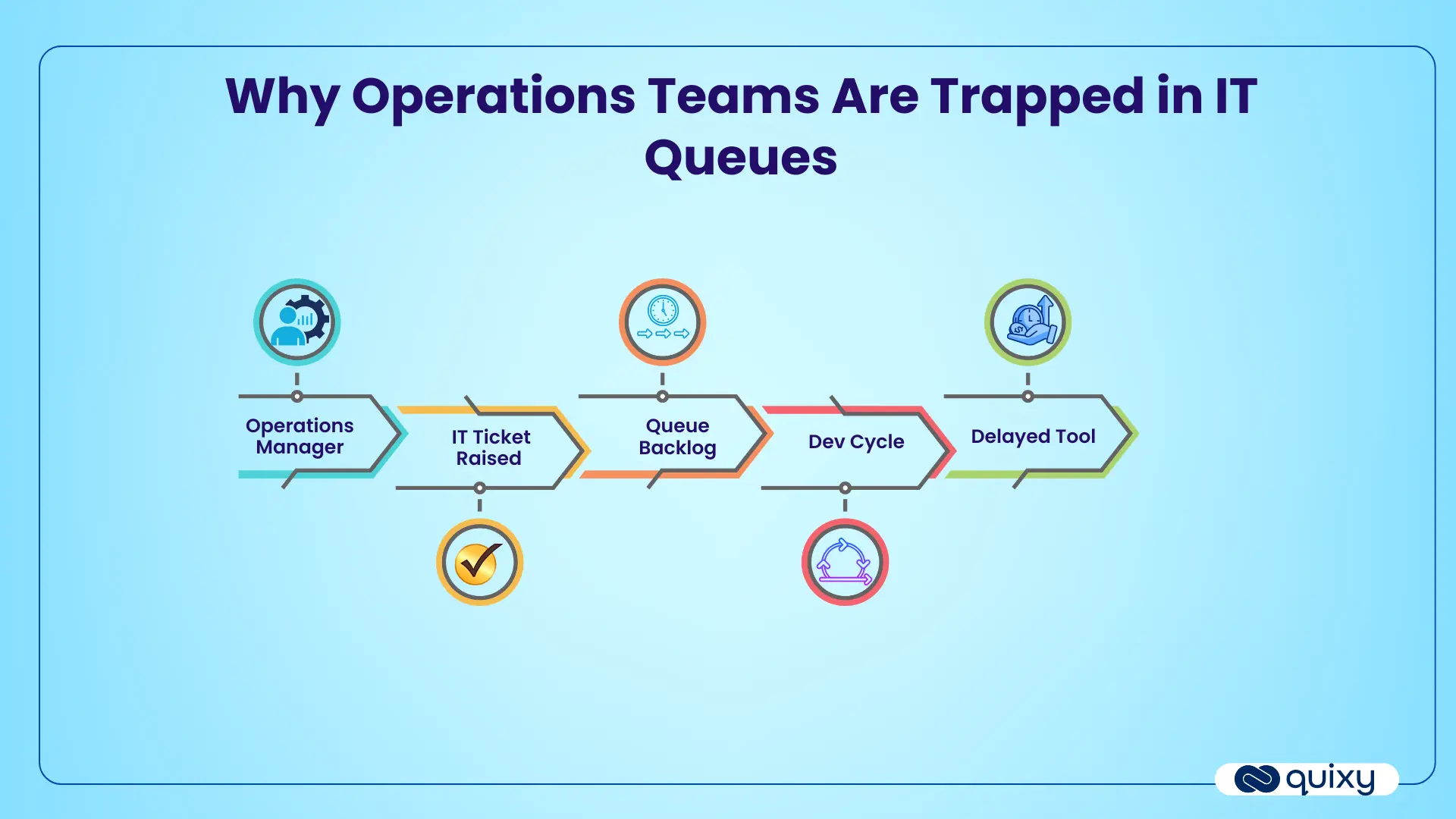
Operations teams manage processes that are repetitive, rule-based, and approval-driven — exactly the kind of work that benefits most from simple automation and structured data collection. Request management, vendor onboarding, asset tracking, incident logging, approval routing: none of these require sophisticated software engineering. They require forms, workflows, notifications, and dashboards. Simple components.
But in most enterprises, “simple” and “fast” rarely coexist when IT is the only path to a functional tool. The business case for a small internal app rarely rises to the top of a development priority list. By the time a tool gets built — if it gets built — the requirements have changed, the team has built a workaround they’re now used to, and the original problem has been absorbed into standard operating procedure.
The result is an operations function that runs on a patchwork of spreadsheets, email chains, and manual follow-ups — not because people want it that way, but because the alternative requires resources that aren’t available for small internal tools.
No-code workflow platforms shift this equation by giving non-technical users the ability to build functional internal apps using visual interfaces, drag-and-drop form builders, and configurable workflow logic. IT sets the guardrails — access controls, data governance, integration standards — and operations teams build and iterate within them. The bottleneck dissolves, and the tools that have been sitting on a backlog for months get built in days.
What Internal Apps for Operations Managers Actually Are
An internal app in this context isn’t a consumer product or a customer-facing interface. It’s a lightweight operational tool that a specific team uses to manage a specific process — collecting structured information, routing it through a defined workflow, triggering notifications, tracking status, and generating visibility for whoever needs to see it.
Most of the internal tools operations teams need fall into a small number of categories: request management, approvals, task tracking, data collection, incident logging, and reporting. The specific content of each tool varies by team and industry, but the underlying structure — form, workflow, notification, dashboard — is consistent across almost all of them.
What makes these buildable without IT is that no-code platforms handle the technical infrastructure — database, logic engine, user authentication, notification system — through configuration rather than code. The operations manager defines what fields go on a form, what happens when it gets submitted, who approves what, and what the dashboard should show. The platform handles the rest.
The non-technical professionals who build these tools — operations managers, process owners, team leads — are what the industry now calls citizen developers: subject matter experts who understand the business problem deeply and have been given the tooling to solve it without requiring developer involvement.
7 Internal Apps Operations Managers Can Build Without IT Tickets
1. Request Management App
Every operations team manages a volume of internal requests — facility requests, admin support requests, resource requests, equipment needs. In most teams, these come in over email, chat, or verbal conversation, get tracked inconsistently, and occasionally get dropped when the person managing them is out of office.
A request management app replaces that informal channel with a structured intake process: a form that captures what’s being requested, by whom, for what purpose, and by when. Submissions route automatically to the right handler, trigger a notification, and create a trackable record. Requesters get status updates without having to follow up manually. Managers get a live view of open requests, pending actions, and resolution timelines.
This is one of the highest-ROI first apps for an operations team to build because the manual effort it replaces is visible and immediately measurable. The time spent chasing requests, following up on forgotten submissions, and reconstructing what was asked for and when is significant — and it disappears the moment a structured process exists.
2. Approval Workflow App
Approvals are where operations workflows break down most visibly. Purchase approvals, vendor approvals, travel requests, document sign-offs — all of them tend to accumulate in email inboxes, where they get missed, delayed, or approved without proper documentation. When an auditor asks for approval records, the answer is usually a fragmented email search rather than a clean, traceable log.
An approval workflow app structures the entire approval chain: a submission form captures the request and supporting details, the workflow routes it to the appropriate approver based on configurable rules (amount thresholds, department, request type), reminders go out automatically if approvals are pending beyond a defined timeframe, and every decision — approved, rejected, sent back for revision — is timestamped and recorded.
Operations teams building approval tools on a no-code workflow automation platform can configure parallel approval paths, conditional routing, and SLA escalation — capabilities that previously required IT involvement to build and maintain. The audit trail this produces isn’t just operationally useful — it’s the kind of documentation that enterprise approval workflow design best practices consistently identify as a compliance requirement that informal email-based approvals simply cannot satisfy. Building this app is simultaneously an efficiency improvement and a compliance risk reduction.
3. Task and SLA Tracking App
Operations managers are responsible for ensuring that work gets done on time, by the right person, with the right escalation when it doesn’t. In practice, this often means maintaining a manual tracker, sending reminder emails, and spending a significant portion of every week following up on tasks that should have been completed without a chase.
A task and SLA tracking app automates that follow-up loop. Tasks get created with owners, deadlines, and defined SLA thresholds. The system sends automated reminders as deadlines approach, escalates to a manager when an SLA is breached, and maintains a real-time view of what’s on track, what’s at risk, and what’s overdue. The operations manager gets visibility without having to generate it manually.
This is particularly valuable in multi-team operations environments where tasks span departments and no single person has natural visibility into the full picture. A shared tracking app creates that visibility structurally rather than depending on everyone remembering to update a shared spreadsheet.
4. Vendor Onboarding App
Bringing a new vendor into the organization involves a predictable sequence of steps: collecting company details and documentation, running through an approval process, setting up payment terms, and creating a record that finance, procurement, and legal all need access to. In most organizations, this process happens across email threads, attached PDFs, and informal handoffs — producing inconsistent records and a process that varies significantly depending on who’s managing it.
A vendor onboarding app standardizes that sequence. Vendors submit their details through a structured form, documents get collected and stored automatically, the approval workflow routes to procurement, legal, and finance in the right sequence, and a complete vendor record is created that everyone with appropriate access can reference. Renewal dates trigger automated reminders before they lapse. The entire process becomes consistent, trackable, and auditable regardless of which team member is managing any given vendor relationship.
5. Asset and Inventory Tracking App
Laptops, office equipment, tools, consumables, branch-level inventory — operations teams are responsible for knowing where assets are, who has them, and when they need to be replenished or serviced. The default tracking mechanism in most teams is a spreadsheet that’s perpetually slightly out of date and maintained by whoever remembers to update it.
An asset tracking app replaces the spreadsheet with a living record. Assets get logged with ownership, location, condition, and maintenance schedule. Assignments and returns get recorded. Low inventory triggers automatic notifications. Maintenance due dates generate reminders before something breaks rather than after. And the operations manager has a real-time view of asset status across the team or organization without needing to audit a spreadsheet manually.
For multi-location operations teams, this becomes even more valuable — the ability to see asset distribution and status across branches in a single view, without emailing each location for an update, produces a level of operational visibility that most teams simply don’t have today.
6. Incident and Issue Reporting App
Operational incidents — equipment failures, safety issues, process breakdowns, facility problems — need to be reported, routed to the right owner, resolved within a defined timeframe, and documented in a way that supports root cause analysis and, where relevant, regulatory reporting. The gap between how this should work and how it actually works in most operations teams is significant.
Without a structured incident reporting app, issues get reported informally, resolution depends on individual follow-through rather than defined process, and the historical record of what happened and how it was resolved exists only in scattered emails and personal notes. Identifying patterns — the same equipment failing repeatedly, the same process breaking down in the same way — requires someone to manually piece together a picture from inconsistent records.
An incident reporting app creates the structured record from the moment an issue is logged: categorized, timestamped, assigned to an owner, tracked through resolution, and stored in a searchable log. Patterns become visible. Response times become measurable. And when a compliance review asks for evidence of how incidents are managed, the documentation exists in a usable form rather than needing to be reconstructed.
7. Daily Operations Dashboard App
Visibility is one of the core operational challenges for any manager responsible for multiple teams, processes, or locations. Getting a reliable picture of what’s happening — what’s running smoothly, what’s falling behind, where manual bottlenecks are forming — typically requires collecting updates from multiple people, consolidating them manually, and accepting that the picture is always slightly out of date by the time it’s complete.
A daily operations dashboard app creates that visibility structurally. Teams submit standardized updates through a form — process status, volumes completed, open issues, blockers. The dashboard aggregates those inputs in real time and presents a live operational picture that the manager can check at any point without waiting for a morning standup or a manual update cycle.
This app is also the one that most directly surfaces the warning signs of workflow bottlenecks in enterprises before they become performance problems — because when the same issue appears in daily updates repeatedly, or the same step consistently shows a backlog, the pattern is visible immediately rather than emerging slowly through lagging indicators. For a broader view of what operations teams can automate beyond dashboards, the top no-code automation tools guide covers the full capability range of enterprise-grade no-code platforms across use cases.
How to Choose Which App to Build First
With seven options on the table, the practical question is where to start. A simple scoring approach works well: identify the process that combines the highest manual effort, the most frequent recurrence, the clearest approval or routing logic, and the lowest technical complexity. The intersection of those four factors points to the highest-impact first build.
For most operations teams, this is either the request management app or the approval workflow app — both involve processes that happen daily, generate significant manual overhead, and have straightforward logic that translates cleanly into a no-code workflow. Starting with one of these produces a visible win quickly, builds team confidence in the citizen development model, and creates a template that makes the next app faster to build.
How Quixy Helps Operations Managers Build Internal Apps Without Coding
Quixy’s platform is designed around the specific requirements of enterprise citizen development — giving non-technical users the ability to build functional workflow apps while maintaining the governance and security controls that IT requires.
The visual workflow builder lets operations managers configure approval chains, escalation rules, and notification triggers without writing logic manually. Form builders support the full range of data types operations teams work with — text, numbers, file uploads, dropdown selects, date fields. Role-based access controls ensure that the right people see the right data. Dashboards are configurable to surface the operational metrics that matter for each specific team and use case.
Critically, Quixy operates within an enterprise workflow governance framework — which means IT can define the guardrails within which citizen developers operate, rather than having to review and approve every individual app. Operations teams move quickly, IT maintains control, and the organization doesn’t accumulate a shadow IT problem in the process.
For teams managing complex, multi-step operational processes, Quixy also supports workflow compliance management requirements — ensuring that the apps operations teams build can generate the audit trails, approval records, and process documentation that compliance reviews require, without those requirements becoming a barrier to building in the first place. For teams evaluating whether no-code is mature enough for enterprise use, no-code and citizen development statistics show 47% of enterprises have already adopted LC/NC platforms, with a further 44% actively considering it — a useful benchmark for internal business case conversations.
IT Should Govern, Not Become a Bottleneck
The right relationship between IT and operations in a citizen development model isn’t zero IT involvement — it’s IT involvement at the right level. IT defines the platform standards, sets the governance framework, manages integrations with core systems, and maintains security controls. Operations teams build the tools their processes actually need, within those standards, without requiring developer time for every tracker, form, and approval workflow.
That’s a better use of IT’s time and a more productive outcome for operations teams. The apps that have been sitting on a backlog for months because they weren’t complex enough to justify a development sprint get built in days. The manual processes that consume hours of operational time every week get replaced with structured workflows. And IT’s capacity stays focused on the infrastructure and integration work that genuinely requires engineering expertise.
The seven apps covered here are a starting point, not an exhaustive list. But they represent the highest-value, most immediately buildable internal tools for most operations teams — and the ones where the gap between current practice and what’s possible with no-code is most visible and most costly.
Frequently Asked Questions(FAQs)
Q. What are internal apps for operations managers?
Internal apps for operations managers are lightweight digital tools built to manage specific operational processes — such as approvals, request tracking, vendor onboarding, asset management, and incident reporting. Unlike off-the-shelf software, these apps are built around a team’s exact workflow, data requirements, and approval logic. With no-code platforms, operations managers can build and deploy these tools themselves without involving IT or writing a single line of code.
Q. How can operations managers reduce IT dependency?
Operations managers can reduce IT dependency by using no-code workflow platforms to build small internal tools themselves — request forms, approval chains, trackers, and dashboards — without raising IT tickets for every process need. IT remains responsible for governance, security, and system integrations, but routine operational app building moves to the business team. This frees IT capacity for strategic infrastructure work while giving operations teams the speed and flexibility they need.
Q. How do operations managers build apps without coding?
Operations managers build apps without coding using no-code platforms that provide visual drag-and-drop form builders, configurable workflow logic, automated notifications, and dashboard tools. Instead of writing code, the manager defines what fields a form needs, what happens when it’s submitted, who approves what, and what the output dashboard should show. The platform handles the underlying technical infrastructure — database, logic engine, user authentication — through configuration rather than programming.
Q. What internal app should an operations team build first?
Start with the process that combines the highest manual effort, the most frequent recurrence, and the simplest approval logic. For most operations teams, that’s either a request management app or an approval workflow app — both replace high-volume manual processes immediately, produce visible time savings within days of deployment, and create a reusable template that makes the next app faster to build. Avoid starting with complex multi-system integrations — keep the first build simple and high-impact.
Q. Are no-code apps secure enough for enterprise use?
Yes — enterprise-grade no-code platforms include role-based access controls, data encryption, SSO integration, audit logging, and compliance certifications such as ISO 27001 and SOC 2 Type 2. IT teams set the governance guardrails within which citizen developers operate, ensuring that every app built on the platform stays within approved security and data handling boundaries. The key is choosing a platform built for enterprise use rather than a lightweight consumer tool.
Q. Who governs no-code apps built by operations teams?
IT governs the platform standards, security controls, data policies, and integration permissions — the guardrails within which operations teams build. Individual operations managers govern their own apps within those standards: defining access, maintaining workflows, and updating forms as processes change. This shared model — IT as platform governor, operations as app builder — is what makes citizen development scalable in an enterprise environment without creating a shadow IT problem.

Recent Posts







- Download the App