

The right business process management tools should do three things: map how work actually happens, automate the repetitive parts of it, and give you visibility into where processes break down. This guide compares the top BPM tools and software on the market in 2026, what each is actually best for, and how to choose between them.
According to Gartner, using BPM software can help you increase your project success rate by 70%.
What Is BPM Software?
BPM software (business process management software) is a platform used to design, automate, monitor, and continuously improve business processes — things like approvals, onboarding, procurement, and case management. Unlike a single-purpose automation script, BPM software is built to manage an entire process end-to-end, including the people, decisions, and exceptions involved, not just the repetitive steps.
Types of BPM Software
- Traditional/code-heavy BPM suites — built for IT-led implementation, deep customization, high setup cost (e.g., Pega, legacy Appian deployments).
- No-code/low-code BPM platforms — built so business teams and IT can both build and modify processes without heavy development (e.g., Quixy, Kissflow).
- Open-source process engines — developer-oriented, highly flexible, requires in-house technical resourcing (e.g., Camunda).
- Work-management platforms with BPM features — general project/work tools that have added workflow and approval capability (e.g., monday.com).
Key Features to Look for in BPM Software
- Visual process modeling — drag-and-drop process design without requiring BPMN expertise to get started.
- Workflow automation and approvals — conditional routing, escalations, and SLA tracking built in.
- Governance and audit trail — full history of who changed what, required for regulated industries.
- Integration depth — connectors into ERP, CRM, and other systems of record, not just standalone workflows.
- Analytics and process mining — visibility into where a process is actually slowing down, not just whether it completed.
- Scalability for enterprise use — role-based access, multi-department deployment, and API access for custom integrations.
Also read: 10 Valuable Benefits of Business Process Management
Top 10 BPM Software and Tools Compared
| Tool | Best For | Deployment Style | Governance/Compliance |
|---|---|---|---|
| Quixy | Enterprises wanting business teams to build and modify processes without coding | No-code, cloud | Role-based access, audit trail, enterprise security certifications |
| Kissflow | Mid-market to enterprise workflow and case management | No-code/low-code, cloud | Built-in approval governance |
| Appian | Large enterprises needing deep process orchestration and case management | Low-code, cloud/on-prem | Strong compliance tooling, higher implementation overhead for smaller teams |
| Pega | Highly regulated, complex enterprise processes at scale | Low-code, cloud/on-prem | Extensive audit and compliance features, steep learning curve |
| Nintex | Organizations already invested in Microsoft/SharePoint ecosystems | Low-code, cloud | Standard enterprise governance controls |
| ProcessMaker | Mid-size teams wanting a straightforward BPMN-based workflow engine | Low-code, cloud/on-prem | Solid audit logging, simpler governance model |
| Bizagi | Teams that want strong process modeling/documentation alongside automation | Low-code, cloud/on-prem | Standard enterprise controls |
| Camunda | Engineering teams needing a developer-first, highly customizable process engine | Code-based/open-source | Requires custom governance build-out |
| monday.com | Teams that want lightweight workflow features inside a broader work-management tool | No-code, cloud | Basic governance; not built as a dedicated BPM suite |
| ServiceNow | Large enterprises centralizing IT and business workflows on one platform | Low-code, cloud | Strong governance, significant licensing cost at scale |

1. Quixy
Quixy is an enterprise no-code platform built so business teams — not just IT — can design, automate, and modify processes directly. It’s a strong fit for organizations that want to reduce dependency on developer backlogs for process changes, while still giving IT the governance and audit controls enterprise deployments require. Quixy includes AI-assisted capabilities for building and running processes, which is a growing differentiator as more BPM buyers look for AI-augmented automation rather than purely rule-based workflows.
Key strengths: true no-code configuration for business users, strong governance and audit controls built in rather than bolted on, and native AI-assisted capabilities for document processing and decision steps within workflows.
Watch out for: as a no-code-first platform, teams with highly specialized custom-development needs outside standard process automation may still need to evaluate integration depth for their specific edge cases — though this covers the large majority of enterprise BPM use cases without added development.
Take the first step and get started with Quixy today.
Also Read: Step Into Success With These 7 Business Process Management Examples
2. Kissflow
Kissflow is a no-code/low-code platform focused on workflow and case management, organized around named business functions like procurement and HR. It’s a solid option for mid-market teams that want fast process digitization without heavy IT involvement.
Key strengths: fast setup for common business functions with pre-built templates, an approachable no-code interface, and function-specific modules (procurement, HR, case management) that map cleanly to common departmental needs.
Watch out for: highly complex, cross-department processes with deep system integrations may need more customization than Kissflow’s template-driven approach is built around, compared to more configurable enterprise suites.
Also Read: Top 15+ Business Process Automation Examples You Need to Know
3. Appian
Appian is a low-code platform built for large-scale process orchestration and case management, commonly used in financial services, insurance, and other heavily regulated industries. It’s designed to handle complex, multi-system processes with a strong emphasis on case management — tracking a piece of work (a claim, an application, a dispute) through every stage and exception rather than just automating a single linear sequence.
Key strengths: deep case management capability, strong integration tooling for connecting legacy systems, and AI-assisted process design features added in recent releases.
Watch out for: Appian typically requires more implementation investment and specialized configuration than no-code alternatives, and licensing is usually enterprise-quoted rather than self-service. It’s a strong fit for large organizations with dedicated implementation teams, less so for a business team wanting to self-serve a new process quickly.
4. Pega
Pega is an enterprise-grade BPM and case management suite built for highly regulated industries — banking, insurance, healthcare — running complex, high-volume processes that need extensive audit and compliance tooling. It’s one of the most feature-dense platforms in this category, with strong decisioning and case-management capabilities built specifically for scale.
Key strengths: robust compliance and audit features, strong decisioning engine for complex approval logic, and proven performance at very high transaction volumes.
Watch out for: Pega comes with a steeper learning curve and higher total cost of ownership than most alternatives on this list, and implementations typically require certified Pega developers or partners. It’s best suited to large enterprises with dedicated implementation teams and budget to match, not mid-market teams wanting a fast rollout.
5. Nintex
Nintex is a workflow automation platform that integrates tightly with Microsoft 365 and SharePoint, making it a natural fit for organizations already standardized on that ecosystem. It’s particularly strong for document-centric processes — approvals, contract routing, forms-based workflows — where the process largely lives inside Microsoft’s document and collaboration tools already.
Key strengths: native Microsoft/SharePoint integration, strong forms and document-generation capability, and a process-mapping tool (Nintex Promapp) for documenting processes before automating them.
Watch out for: Nintex’s value proposition weakens for organizations not already invested in the Microsoft ecosystem, and its BPM/case-management depth is lighter than dedicated suites like Appian or Pega for highly complex, cross-system processes.
6. ProcessMaker
ProcessMaker offers a BPMN-based workflow engine aimed at teams that want standardized process modeling without the complexity of larger enterprise suites. Because it’s built around the BPMN standard, it’s a reasonable choice for organizations that already have process documentation in BPMN format or want that level of modeling rigor without a heavyweight platform.
Key strengths: BPMN-standard process modeling, both cloud and on-premise deployment options, and a more approachable price point than Pega or Appian.
Watch out for: the BPMN-first approach can require more process-modeling expertise upfront compared to a purely visual, no-code builder, which may slow down business users who aren’t familiar with BPMN notation.
7. Bizagi
Bizagi is known for strong process modeling and documentation capabilities alongside its automation engine, appealing to teams that prioritize clear process visualization before and during automation. Its process modeler is often used as a standalone documentation tool even by teams not yet ready to automate, which makes it a useful entry point for process-improvement initiatives.
Key strengths: strong visual process modeling and documentation, cloud and on-premise deployment, and a relatively approachable learning curve for business analysts.
Watch out for: Bizagi’s automation and integration depth is generally considered lighter than Appian or Pega for very complex, high-volume enterprise processes.
8. Camunda
Camunda is an open-source, developer-first process orchestration engine built around the BPMN and DMN standards. It offers deep flexibility and is popular with engineering teams building process automation directly into their own applications and microservices architecture, rather than using a standalone business-user tool.
Key strengths: open-source flexibility, strong fit for developer-led, code-integrated automation, and active community support.
Watch out for: Camunda requires in-house engineering resources to implement and maintain — it’s built for developers, not business users, so it’s less suited to teams wanting to self-serve process changes without writing code.
9. monday.com
monday.com is primarily a work-management platform that has added workflow automation features over time. It’s a reasonable lightweight option for smaller teams that want simple automations (status changes, notifications, basic approvals) layered on top of project and task tracking they’re already using.
Key strengths: intuitive interface, fast setup, and useful for teams already using monday.com for project management who want basic automation without adopting a separate tool.
Watch out for: it isn’t built as a dedicated BPM suite and lacks the depth of process governance, audit trail, and complex case-management capability that purpose-built BPM platforms offer — it works well for simple workflows, not enterprise-grade regulated processes.
10. ServiceNow
ServiceNow centralizes IT service management and business workflows on one platform, making it a common choice for large enterprises consolidating multiple tools into a single system of record. Originally built around IT service management, it has expanded significantly into broader business process and workflow automation over recent years.
Key strengths: strong IT service management heritage, broad platform reach across departments once adopted, and solid governance and compliance tooling.
Watch out for: licensing costs scale significantly with usage and user count, which is worth budgeting for carefully at enterprise scale — it’s typically a larger commitment than adopting a dedicated, narrower BPM platform for a single department’s needs.
How to choose a Business Process Management software vendor?
Consider the following points before selecting a business process management platform for your business:
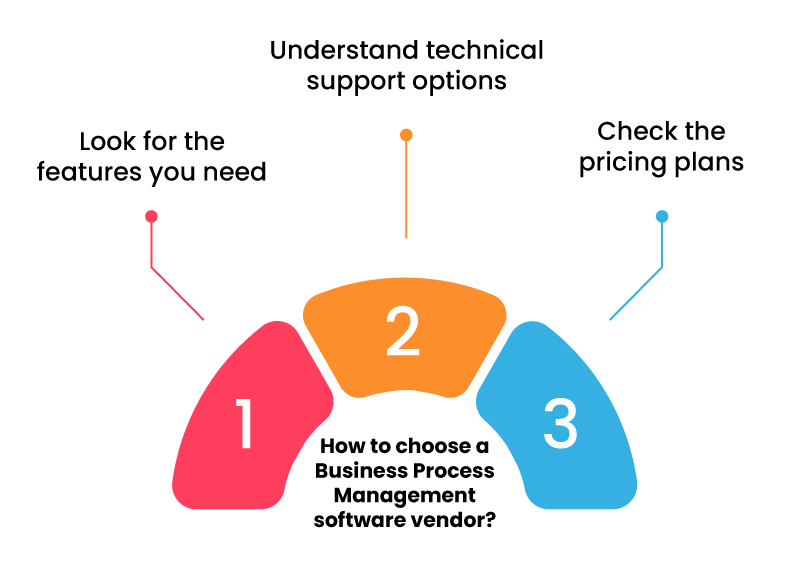
1. Look for the features you need
Most business process automation software is loaded with features. This can complicate the software, especially when you don’t understand or need all the provided features. Therefore, before selecting a BPM software for your business, thoroughly check the provided features and choose the one that fulfills your needs.
2. Understand technical support options
Technical issues can come up anytime. Hence, it is wise to understand the available specialized support options. While purchasing BPM software for your business, ask the vendor about the software’s support options. Understand if instant chat or call support is available and how you can reach the support team.
3. Check the pricing plans
All the BPM software comes with different pricing plans, and each plan offers a different set of features. Even if the software provides the features that you need, they may not be included in the pricing plan that your budget allows. Therefore, analyze your needs and see which pricing plan fulfills them the best.
Conclusion
Start with who needs to build and modify processes day-to-day. If that’s primarily IT, a code-heavy or open-source option like Camunda may fit. If business teams need to make changes without waiting on a developer queue, a no-code platform like Quixy’s business process automation platform will get processes live faster and keep them adaptable as requirements change. Weigh governance requirements next — regulated industries should prioritize audit trail depth and access controls over raw feature count.
Frequently Asked Questions(FAQs)
Q. How do BPM tools help streamline and improve business processes?
BPM tools streamline and improve business processes by automating repetitive tasks, providing visibility into workflows, facilitating team collaboration, and enabling continuous optimization through data analysis and process monitoring.
Q. What are the key features to look for in a BPM tool?
Key features to look for in a BPM tool include process modeling and design, workflow automation, task management, reporting and analytics, integration capabilities, scalability, and user-friendly interface.
Q. Can BPM tools integrate with other software systems used by our business?
Yes, BPM tools can integrate with other software systems your business uses through APIs, connectors, or pre-built integrations, ensuring seamless data exchange and interoperability across various platforms and applications.
Q. How easy is it to implement and use BPM software within our organization?
Implementing and using BPM software within your organization depends on factors like the complexity of processes, customization requirements, user training, and vendor support. However, many modern BPM tools offer intuitive interfaces and guided implementation processes to simplify adoption.
Q. What level of customization is available with the BPM tools?
BPM tools often offer varying levels of customization, allowing organizations to tailor processes, forms, workflows, and user interfaces to their specific requirements. Customization may include adding or modifying fields, designing new workflows, defining business rules, and incorporating branding elements.
Q. How does the pricing structure of different BPM tools compare?
Pricing structures for BPM tools can vary based on features, scalability, deployment options (cloud-based or on-premises), user licenses, and support levels. Some vendors offer subscription-based pricing models with tiered plans, while others may charge based on usage or offer one-time licensing fees. Comparing pricing structures can help identify the most cost-effective solution for your business.
Related Post


Please login to comment
0 Comments
Oldest
Recent Posts




- Download the App