

If you’re new to app development, the whole thing can look intimidating – code, frameworks, developers, timelines. It doesn’t have to be. This guide breaks down the app development basics in plain language: what it actually means, the types of apps you can build, and a simple, repeatable process to go from an idea to a working app – with or without writing code.
What is app development? App development is the process of creating software applications that solve a problem or improve how something works from a customer-facing mobile app to an internal tool that automates a business workflow. It involves defining the problem, designing how users will interact with the app, building it, testing it, and launching it. Traditionally this required coding; today, no-code and low-code platforms let non-technical people build apps visually.
What Does App Development Actually Mean?
At its simplest, app development means turning an idea into a working piece of software. That software might be a mobile app your customers download, a web app your team logs into, or an internal tool that replaces a messy spreadsheet or a manual approval process. The goal is always the same: solve a real problem for the people who will use it.
For years, building an app meant hiring developers and waiting weeks or months. That’s changed. Modern no-code and low-code platforms let business users build functional apps themselves using visual, drag-and-drop tools — which is why “app development” is no longer just an IT skill, but a practical one for anyone who wants to solve a problem faster.
The Main Types of Apps
Before you build, it helps to know what kind of app you’re building. The four common types:
- Web apps — run in a browser, accessible from any device with internet. Good for tools your team or customers use online.
- Mobile apps — built for phones and tablets, using features like the camera or GPS. (See our guide to custom mobile app development.)
- Desktop apps — installed on a computer, with strong performance and offline use.
- Cross-platform apps — one build that works across devices and operating systems.
Most business apps today are web or cross-platform, because they’re the easiest to access, update, and maintain.
Why Building an App Is Easier Than It Used to Be
The biggest barrier to app development used to be technical skill. Traditional development is slow, expensive, and dependent on scarce developers — which is exactly why so many good ideas never got built. No-code and low-code platforms removed that barrier by replacing hand-written code with visual building blocks.
The shift is real and measurable: Gartner forecasts that by 2026, developers from outside formal IT departments will make up at least 80% of the people building on low-code tools, up from 60% in 2021. In other words, app development is increasingly done by the people closest to the problem — not just professional coders.

App Development Basics: 6 Key Steps to Get Started
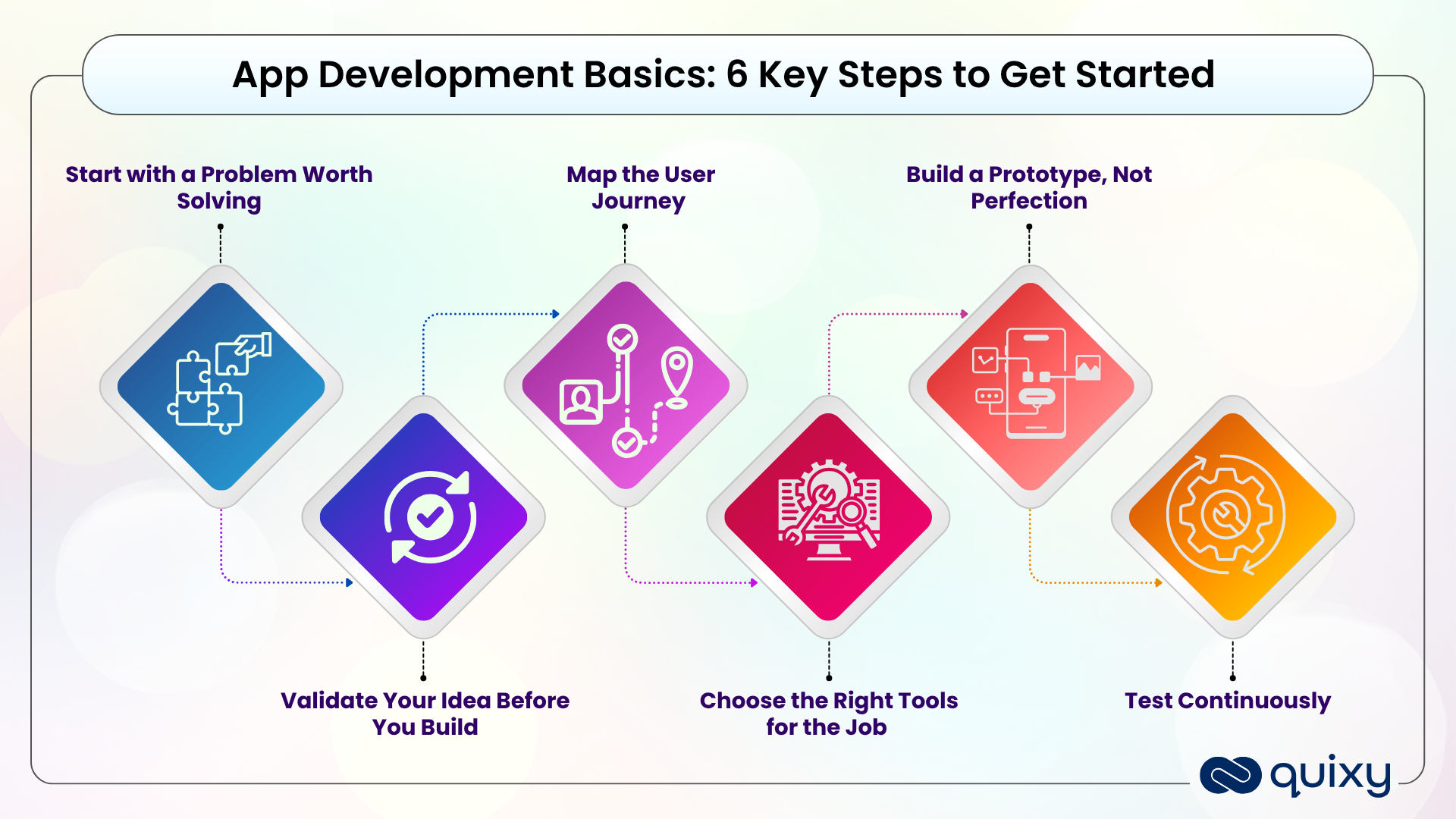
Whether you code it or build it on a no-code platform, every app follows the same core path. Here are the six basic steps to build your first app:
- Start with a problem worth solving. Don’t build because you can -build because there’s a real pain point. A broken internal process or a frustrating customer experience gives your app a clear purpose. If you can define the problem in one sentence, you have your starting point.
- Validate the idea before you build. Talk to the people who’ll actually use the app. Confirm the problem is real and worth solving before you invest time. Early proof beats late regret.
- Map the user journey. Sketch how someone will move through the app — what they see first, what they tap, how they complete a task. Simplicity keeps people coming back; complexity drives them away.
- Choose the right tools. Decide how you’ll build: traditional coding, or a no-code/low-code platform. For most business apps, and for beginners especially, a no-code platform is faster and needs no technical background.
- Build a prototype, not perfection. Create a basic, working version first. Put it in front of real users and learn from how they actually use it. Feedback on a rough prototype is worth more than a year of assumptions.
- Test continuously. Check performance, security, and usability throughout — not just at the end. Reliable, smooth functionality is what earns users’ trust.
That’s the foundation. For a deeper look at the full delivery process — including planning, deployment, and maintenance — see the application development lifecycle.
Do You Need to Know How to Code?
No. This is the single biggest myth that stops beginners. With a no-code platform, you build apps visually — dragging and dropping forms, workflows, and dashboards instead of writing code. Low-code platforms add optional coding for advanced needs, but for most business apps you won’t touch a line of it. The skill that matters most isn’t programming; it’s understanding the problem you’re solving.
By 2028, 80% of GenAI business apps will be built on existing data platforms, cutting development time and complexity in half, according to Gartner.
Common Beginner Mistakes to Avoid
- Building before validating. The most common mistake — investing time in an app nobody asked for. Confirm the need first.
- Trying to build everything at once. Start with the core feature that solves the main problem. Add the rest later.
- Ignoring the user journey. A powerful app people find confusing won’t get used. Design for clarity.
- Skipping testing. Small issues become big ones after launch. Test as you go.
- Choosing tools that don’t fit. Match the platform to your skills and your goal — don’t over-engineer a simple app.
Build Your First App with Quixy — No Coding Needed
Quixy is a no-code platform built for exactly this: helping people with no technical background build real business apps. You get a drag-and-drop builder, ready-made templates for common needs like HR, finance, and project management, AI-assisted suggestions as you build, and apps that work on mobile and desktop from day one — all with enterprise-grade security and IT governance behind the scenes.
Start with your idea and turn it into a working app in days, not months. Book a free demo to build your first app →
Already comfortable with the basics? See how app building has evolved in our guide to modern application development in 2026 — the trends, technologies, and strategic shifts reshaping how teams build software today.
The Bottom Line
App development isn’t the developers-only discipline it once was. If you can clearly define a problem, you can build an app to solve it — especially with a no-code platform that handles the technical complexity for you. Start small, solve one real problem, learn from real users, and build from there. The hardest part isn’t the technology; it’s simply starting.So, ready to build powerful apps faster? Schedule a Call with our experts and unlock the true potential of RAD for your business.
Frequently Asked Questions (FAQs)
What are the basics of app development?
The basics of app development are: identify a problem worth solving, validate the idea with real users, map the user journey, choose your build tools, create a prototype, and test continuously before launch. With a no-code platform, this whole process is simplified through visual, drag-and-drop tools that need no coding.
Can I build an app without knowing how to code?
Yes. No-code platforms are designed for people without a coding background. Using a drag-and-drop interface, templates, and AI-assisted suggestions, anyone can build professional business apps without writing code — often going from idea to working prototype in days.
How long does it take to build an app?
Traditional coding can take months. With a no-code platform, a simple app can be built in days and a more complex one in weeks, because visual builders and ready-made templates remove most of the manual work.
What is the difference between no-code and low-code?
No-code platforms let you build apps entirely visually, with no coding at all — ideal for business users. Low-code platforms are also mostly visual but allow optional custom code for advanced requirements, which suits teams with some technical capability.
How do I start building my first app?
Start by writing down the specific problem you want to solve in one sentence. Then choose a no-code platform, pick a template close to your need, and build a simple prototype. Test it with a few real users, refine it, and expand from there.
Is no-code app development secure for business use?
Yes. Enterprise no-code platforms include role-based access controls, data encryption, audit trails, and compliance with recognized security standards, making them suitable for business and even regulated use.
Related Post



Please login to comment
0 Comments
Oldest
Recent Posts





- Download the App