

To learn how to automate a workflow without coding, you need to: identify and name the process, build data capture forms using drag-and-drop field controls, configure the workflow logic with sequential or conditional steps, set business rules and validation conditions, configure access permissions by role, and publish the app with one click. On a no-code platform like Quixy, most teams complete this entire process in 4 to 7 days — compared to 3 to 6 months through traditional IT development. This guide walks through all 6 steps with practical guidance for each.
60% of the current occupations can have 30% or more of their activities automated, according to McKinsey.
Watch Webinar: How to build a simple workflow app with Quixy!

Why automate workflows without coding
Manual workflows have a hidden cost that most organisations underestimate. It is not just the time spent on the task itself — it is the time spent chasing approvals, tracking status across email threads, correcting errors caused by human intervention, and waiting while processes stall at bottlenecks.
With changing times and the onset of digital practices, paper-based and manual processes create compounding problems: complexity, time consumption, human error, limited visibility, and redundancy. These limitations are especially acute for workflows, where each step requires its own information and approvals. A single bottleneck at any stage halts the entire process.
Workflow automation solves this by replacing manual steps with digital logic that runs automatically. The difference with no-code automation is that the people who understand the processes — the operations manager, the HR lead, the compliance officer — can build the automations themselves. They do not need to wait for IT.
Also Read: https://quixy.com/webinar/unlocking-visual-excellence-in-quixy/
What types of workflows can you automate without coding
If a process has defined steps, people who need to act on information, and decisions that route work from one stage to the next — it can be automated without coding. The range is broader than most teams initially expect.
| Department | Workflow examples | What automation replaces |
|---|---|---|
| HR | Employee onboarding, leave requests, expense approvals, performance reviews | Email chains, spreadsheet tracking, manual routing to managers |
| Finance | Purchase order approvals, invoice processing, budget sign-off, expense reimbursement | Paper forms, manual matching, multi-day approval delays |
| Procurement | Vendor onboarding, RFQ management, contract approval, supplier evaluation | Manual data entry, email-based approvals, inconsistent documentation |
| Operations | Field inspection reporting, maintenance requests, incident management, safety checklists | Paper forms, manual data consolidation, delayed reporting |
| Legal & Compliance | Contract review and sign-off, policy acknowledgement, audit evidence collection, regulatory reporting | Shared drives, manual tracking, missed deadlines |
| IT | Service request management, access provisioning, change requests, asset tracking | Ticket email threads, manual prioritisation, status-chasing |
Also Read: What Is Workflow Automation and How It Revolutionises Operations
Benefits of no-code workflow automation
The benefits of workflow automation are well established. What no-code specifically adds is the ability to realise those benefits without IT involvement, without long development cycles, and without the cost of custom software.
Increased productivity
Automated workflows save time and effort, allowing team members to focus on productive tasks instead of mechanical approval chains. Quixy customers have reported a 20% boost in employee productivity and a 40% improvement in satisfaction after automating key workflows.
Reduced costs
Repetitive tasks cost $5 trillion a year globally (Unit4). Eliminating manual steps from approval workflows, data entry, and status tracking directly removes that cost. No-code development also eliminates the expense of custom development for these departmental tools.
Reduced errors
Automated workflows do not make the mistakes human intervention inevitably produces. Mandatory fields, validation rules, and business logic ensure data is captured correctly and processes execute consistently every time.
Rich data collection
Workflow automation completely transforms how data is captured. Automatic reports with actionable insights allow organisations to understand bottlenecks and allocate resources accordingly — based on real-time data, not end-of-month consolidations.
Better task management
Automated workflows make it easy to manage multiple processes simultaneously. Organised, streamlined processes increase the capacity for multitasking — whether onboarding multiple employees or managing numerous IT requests at once.
No IT dependency
Business teams build and own their own workflows without waiting for developer capacity. Changes are made in real time without downtime — the operations manager who built the workflow can update it without filing a ticket.
Also Read: Easy QR Code and Barcode Scanning with Quixy
How to automate a Workflow without Coding
With Quixy, the process of workflow automation is quick and easy. Many customers have used the platform to achieve results by leveraging the power of automation. Here is the complete 6-step process that gets you from idea to live workflow — with practical guidance for each step.
Before you start: The biggest mistake teams make when automating a workflow for the first time is starting with their most complex process. Start with a workflow that is painful, high-frequency, and relatively straightforward — a leave request, an expense approval, a new supplier registration. Get that live, learn from it, then move to more complex processes.
As you can see, with Quixy, you can get started on workflow automation within minutes. The process is quite simple:
Step 1: Label the process
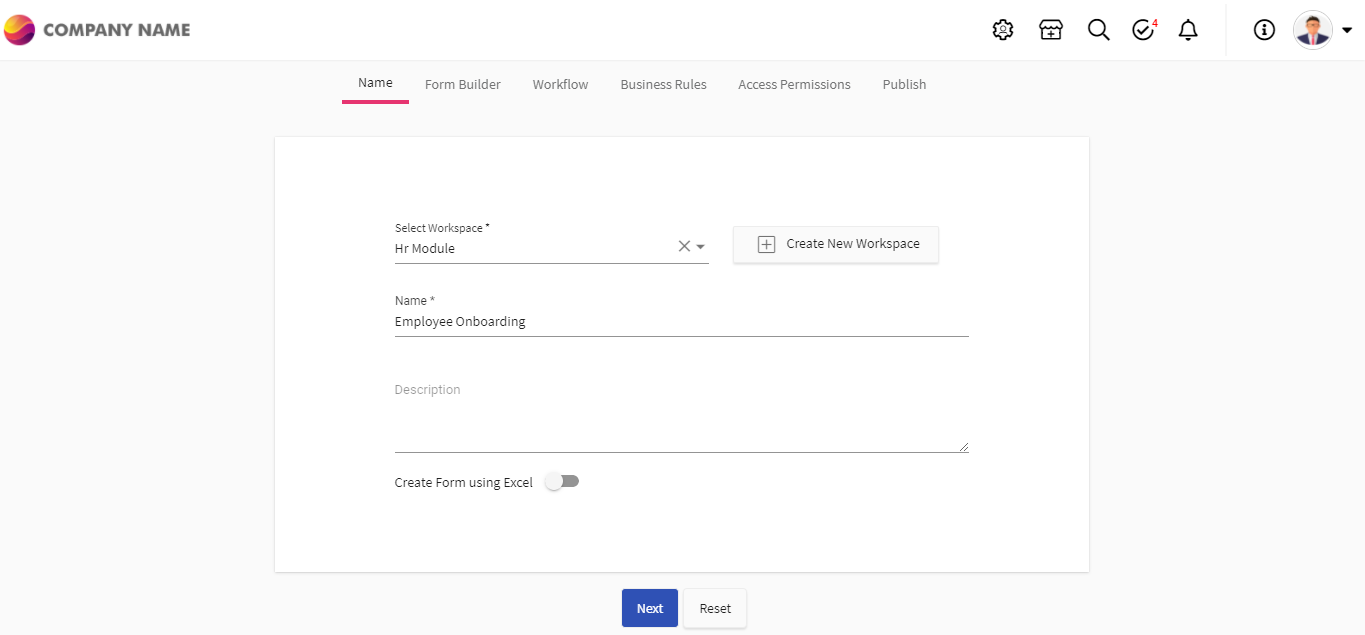
Begin by naming the workflow you are automating. Be specific — not “approvals” but “vendor onboarding approval” or “employee leave request.” A precise name defines the scope and prevents the workflow from expanding beyond its purpose. It also makes it easier for your team to find and use the correct workflow from day one.
Quixy tip: Name workflows by department and action — “Finance: Purchase Order Approval” or “HR: New Employee Onboarding” — so they are searchable and self-explanatory to any user.
Step 2: Build forms to capture information
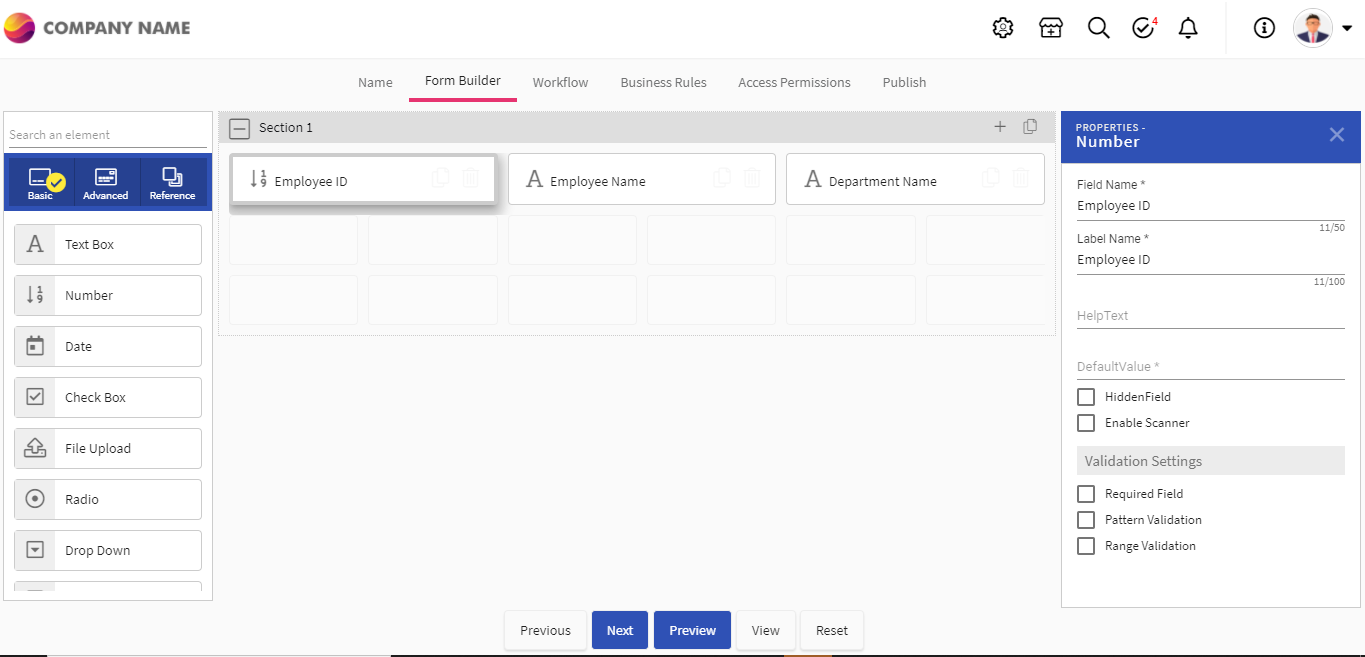
Using Quixy’s 40+ user-friendly drag-and-drop field controls, build forms that capture exactly the information your workflow needs. Field types include text inputs, dropdowns, date pickers, number fields, file uploads, signature capture, QR code scanners, barcode scanners, and facial recognition — all configurable without writing any code.
Think carefully about what data each stage of the workflow needs. The form at the start should capture everything the subsequent approvers will need to make a decision — not more, not less. Unnecessary fields create friction and reduce completion rates.
Quixy tip: Use conditional fields — fields that appear or hide based on previous answers — to keep forms clean while capturing all relevant information for edge cases.
Step 3: Configure and customize your workflow
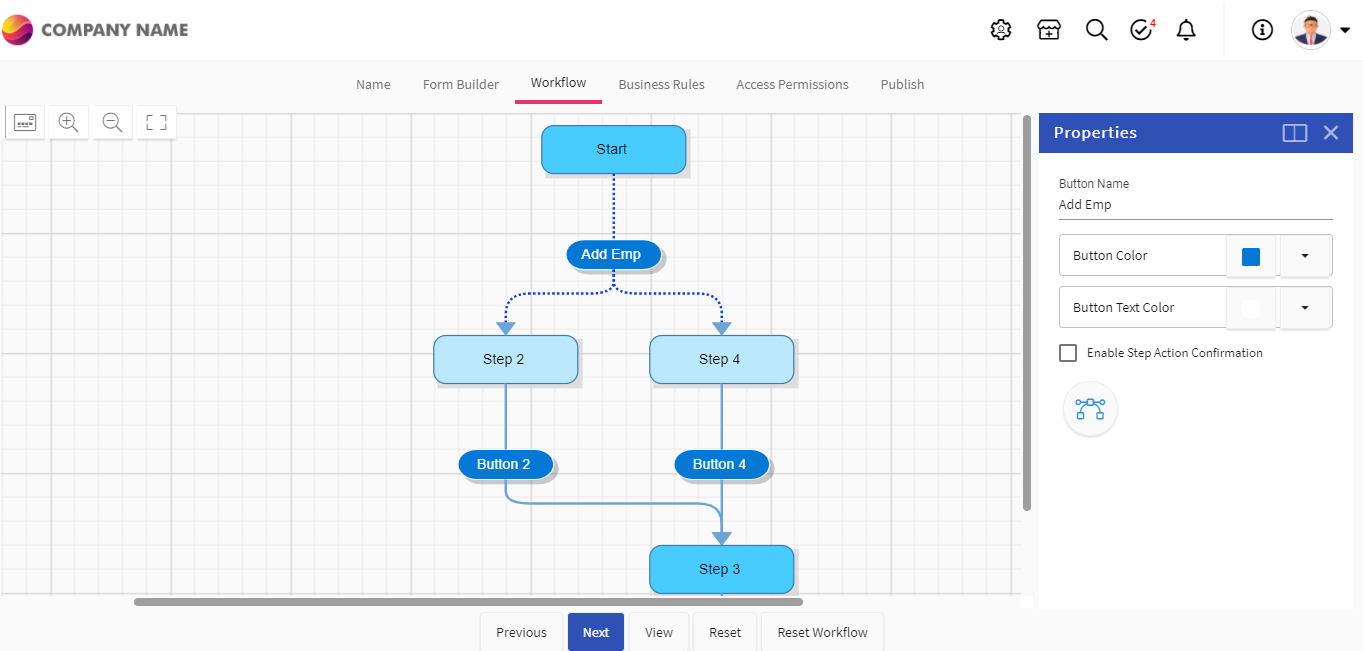
This is where you define the flow of work itself. Who receives what, in what order, and under what conditions. Quixy supports three types of workflow steps:
Sequential steps — one step completes before the next begins. Standard for simple linear approvals.
Parallel steps — multiple approvers or actions happen simultaneously. Useful when legal review and finance review can happen at the same time rather than one after the other.
Conditional steps — the workflow routes differently based on data values. A purchase request under $5,000 routes to a line manager; over $5,000 routes to the CFO. The condition is set visually, not in code.
Quixy tip: Map out your workflow on paper or a whiteboard first. Know all the “if this, then that” conditions before you start configuring. It is much faster to build when you have clarity on the logic upfront.
Step 4: Set up business rule
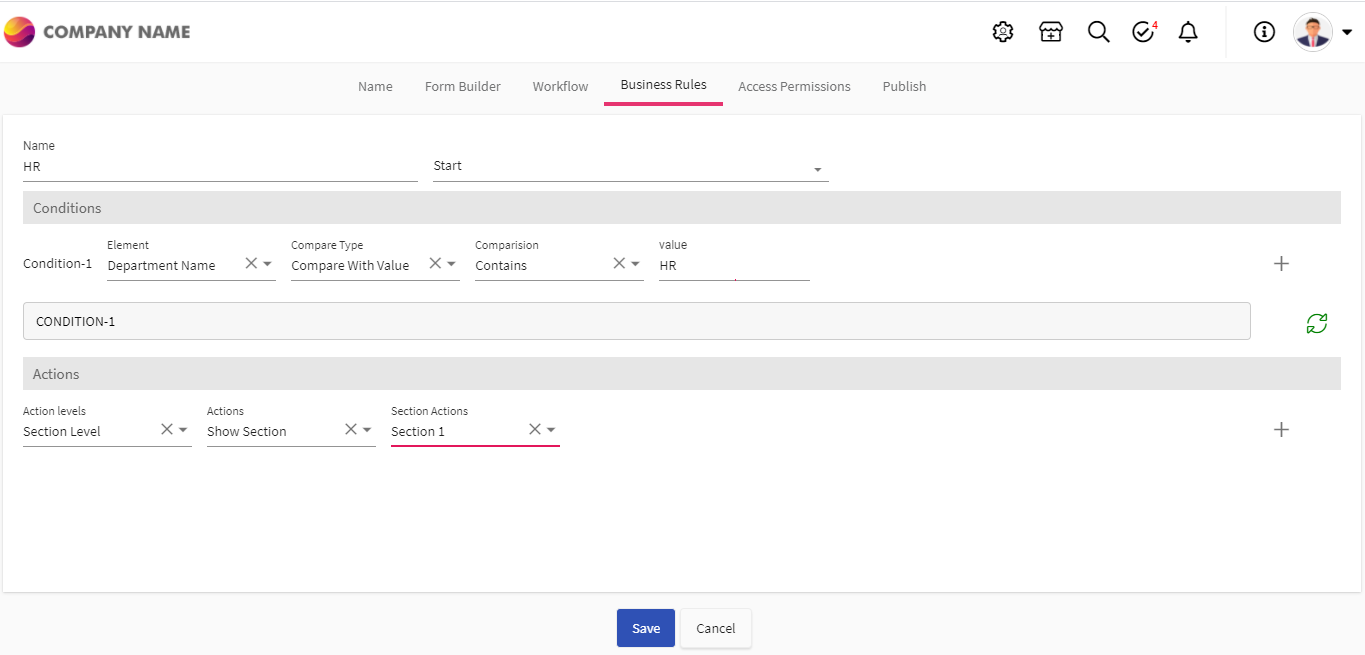
Business rules are the logic that governs how your workflow behaves. They ensure that exceptions, edge cases, and mandatory conditions are handled correctly — automatically, without human intervention at each occurrence.
Common business rules in Quixy workflows include: mandatory field validation (a form cannot be submitted without certain fields completed), approval thresholds (different approval paths trigger based on monetary or categorical values), SLA timers (an approval that has not been actioned within 48 hours escalates automatically to a supervisor), and data format validation (ensuring date fields, email addresses, and numeric fields contain the right types of data).
Quixy tip: SLA escalation is one of the highest-value rules to configure early. It eliminates the most common source of workflow failures — approvals that sit unactioned because no one noticed them.
Step 5: Configure access permissions
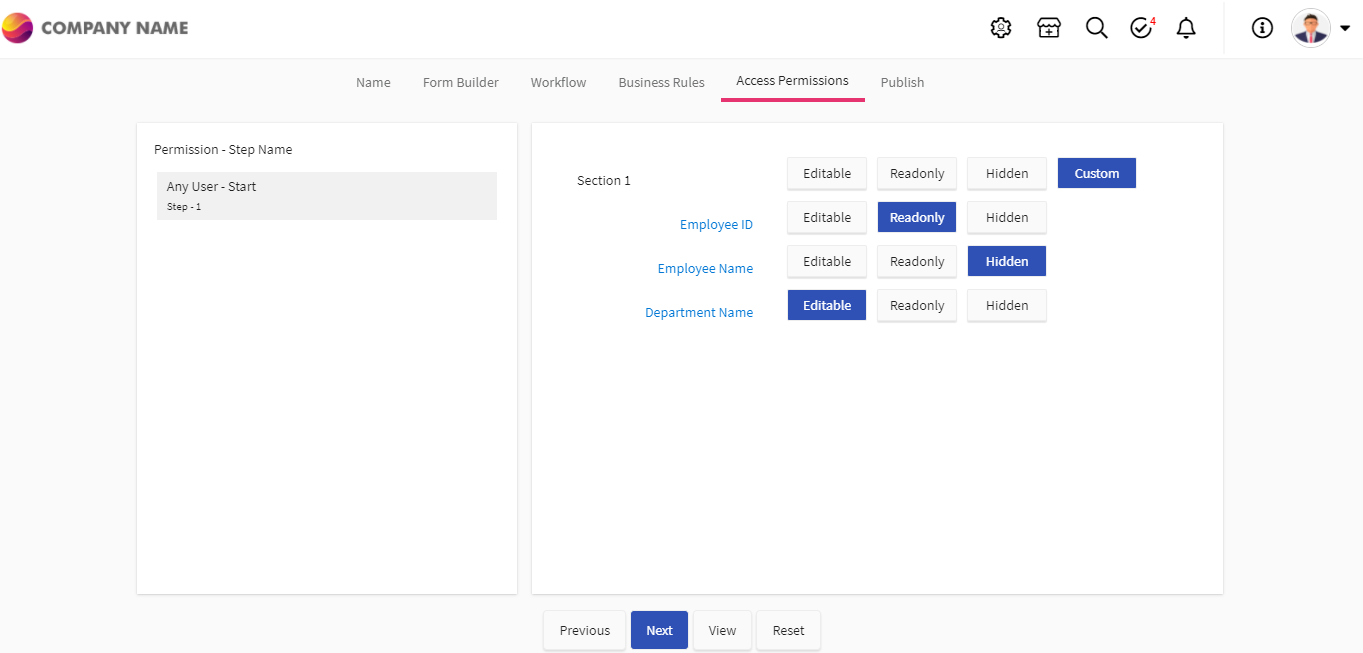
Easily configure access permissions down to the field level. This means you can control precisely what each role can see, edit, and act on at each stage of the workflow — not just at the application level, but at the individual data field level.
A practical example: in a purchase order workflow, the requester can see the full form but cannot edit it after submission. The approving manager sees everything including the budget impact field. Finance sees the full financial data. Vendors accessing a self-service portal see only their own records. All of this is configured visually, without code.
Quixy tip: Plan your role matrix — who can see what — before configuring permissions. List every role that interacts with the workflow and what access they need at each stage. 10 minutes of planning saves hours of reconfiguration.
Step 6: Publish the app
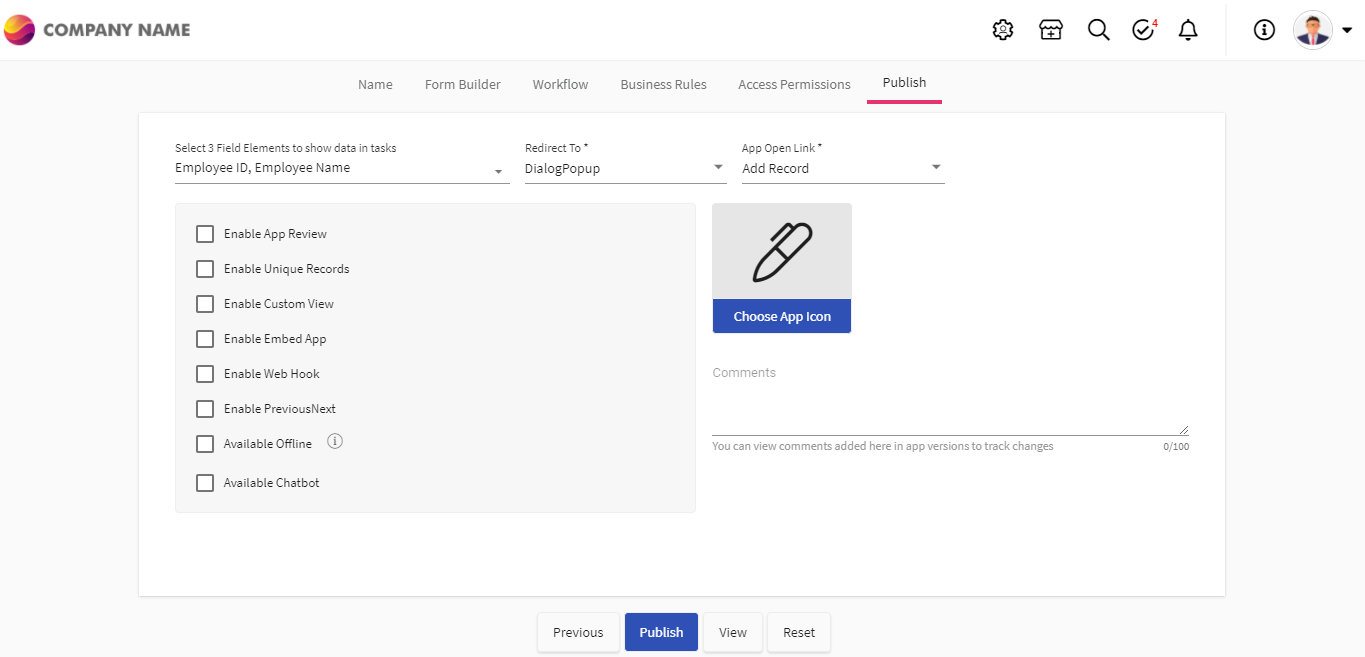
Publish the app for use with a single click. It is immediately accessible from any device — desktop, mobile browser, or tablet — and even works in offline mode. Users in the field can capture data without a network connection, and the data syncs automatically when connectivity is restored.
In the case of any modifications or changes after publication — updating a field, adding a new approval step, changing a business rule — all you need is a few clicks. There is no downtime, no redeployment process, and no developer involvement. The change goes live immediately.
Quixy tip: Do a structured UAT (user acceptance testing) before full rollout — share the app with 3 to 5 actual users from the relevant department and ask them to run through real scenarios. Their feedback will catch edge cases your configuration missed.
In the case of any modifications or changes, all you need are a few clicks here and there without any downtime.
Also Read: What is Workflow Applications? 6 Examples Explaining its Operational Efficiency
How to automate approval workflows specifically
Approval workflows are the most common starting point for no-code automation — and for good reason. Most organisations run approval processes (purchase orders, leave requests, expense claims, contracts, onboarding tasks) dozens or hundreds of times a week. Automating even one of these processes has immediate, measurable impact.
A well-designed no-code approval workflow has five core components:
- Submission form — the requester provides all information the approver will need to make a decision. Good form design means approvers never need to chase additional information.
- Routing logic — based on the data submitted, the system automatically routes to the right approver. A purchase under $1,000 goes to a department manager. Over $1,000 goes to the department head. Over $10,000 goes to the CFO. No manual routing required.
- Parallel or sequential approval — decide whether approvers act one after another (sequential — most common for hierarchical approvals) or simultaneously (parallel — when legal and finance both need to approve independently).
- SLA escalation — if an approval is not actioned within the defined window (24 hours, 48 hours, 72 hours), the system automatically escalates to the approver’s manager. Approval queues never go cold.
- Completion action — when all approvals are complete, the system automatically triggers the next step: sends a notification to the requester, updates a connected system, generates a document, or kicks off the next stage of the process.
The most common approval workflow mistake: Building the approval routing correctly but forgetting to configure the rejection path. A rejected request needs a defined path back to the requester with feedback, an option to resubmit, or a clear end state. Always design both the approval and the rejection journey before building.
Also Read: Visual Workflow Builder: What It Is, How It Works and Why It Matters
How AI is changing no-code workflow automation in 2026
The Search Console data for this blog includes 96 impressions for “build AI workflows with no code” — a query that did not exist two years ago. AI is fast becoming the sharpest differentiator between no-code workflow platforms, moving the value from “build faster” to “build smarter.”
In 2026, AI adds three meaningful layers to no-code workflow automation:
1. AI-assisted workflow building
Instead of configuring every step manually, users describe what they want in plain language and AI generates the initial workflow structure. “Build a purchase approval workflow with three tiers based on amount” produces a starting point that you then configure and refine. This dramatically reduces setup time for complex workflows.
2. Intelligent operational insights — Caddie by Quixy
Once workflows are live and generating data, AI can transform that operational data into decisions. Caddie, Quixy’s AI intelligence layer, lets teams query their workflow data in plain language — “show me all purchase requests over $5,000 that have been pending for more than 48 hours” — without writing any reports or queries. It also proactively detects anomalies in live workflows: approval bottlenecks, unusual patterns, SLA breaches before they escalate.
Also Read: HR Workflow Automation: How to Automate 9 Core HR Processes
3. AI-powered process recommendations
As more workflows run on the platform, AI can identify processes that would benefit from automation — either because they recur frequently, take too long, or have unusually high error rates. Rather than waiting for teams to identify automation opportunities themselves, the platform surfaces them.
Important distinction for evaluators: “AI workflow automation” means different things on different platforms. Some tools use AI only during the build phase (generating workflows from prompts). Others use AI only on the output (reporting on what happened). Quixy’s Caddie operates on the live data generated by running workflows — giving operational intelligence in real time, not just build-time assistance.
Also Read: AI Workflow Automation: A New Era of Streamlined Processes
Build your first automated workflow in Quixy
Bring a real workflow your team needs to automate. Our team builds it with you live in under 30 minutes — no slides, just your process on screen. Schedule a free demo
Conclusion
The merits of workflow automation are endless — and with no-code platforms like Quixy, the barrier to getting started has never been lower. When the process is this simple and fast, there is no reason for digital-ready organisations to leave manual workflows in place.
Automating a workflow without coding is no longer a technical achievement. It is an operational decision. The six steps in this guide — labelling the process, building forms, configuring workflow logic, setting business rules, managing permissions, and publishing — can take a team from idea to live automated workflow in under a week. In some cases, under a day.
The organisations seeing the highest returns from workflow automation are not those with the largest IT teams. They are those who have given their operations, HR, finance, and compliance teams the tools to solve their own problems — without waiting in a development queue. That is precisely what no-code workflow automation makes possible.
Whether you are automating your first leave approval process or building a 15-step vendor onboarding workflow across five departments, the approach is the same: start with one process, get it live, measure the impact, and build from there. Every workflow you automate is capacity your team gets back.
Also Read: https://quixy.com/webinar/accelerate-citizen-development-program/
For a broader view of what operations teams can build independently, see 7 internal apps for operations managers you can build without IT tickets
Frequently Asked Questions(FAQs)
Q. How do I create an automated workflow without coding?
To create an automated workflow without coding: (1) Name the process clearly. (2) Build data capture forms using drag-and-drop field controls. (3) Configure workflow logic — sequential, parallel, or conditional steps. (4) Set business rules and validations. (5) Configure role-based access permissions. (6) Publish with one click. On Quixy, most teams go live in 4 to 7 days.
Q. How long does it take to automate a workflow with no-code?
Most teams deploy their first automated workflow in 4 to 7 days using a no-code platform like Quixy. Simple workflows such as leave request approvals or expense submissions can be live in under a day. Complex multi-step workflows involving multiple departments, conditional routing, and system integrations typically take 3 to 7 days. This compares to 3 to 6 months for the same workflow through traditional IT development.
Q. How do I automate approval workflows without coding?
To automate an approval workflow without coding: define the approval stages, configure the routing logic (which data values trigger which path), set parallel approvals if multiple people need to act simultaneously, add SLA timers that escalate overdue approvals automatically, and configure the completion action that fires when all approvals are done. Quixy’s visual workflow builder handles all of this without any code.
Q. What types of workflows can be automated without coding?
Any process with defined steps and decision points can be automated without coding. Common examples include leave and expense approvals, purchase order workflows, employee onboarding and offboarding, compliance tracking, IT service requests, field inspection and data collection, contract review and sign-off, and vendor or partner onboarding.
Q. Can I automate multi-step approval workflows without coding?
Yes. Quixy supports multi-step approval workflows with conditional routing, parallel approval paths, SLA escalation for overdue approvals, and exception handling for edge cases. Complex approval chains — involving multiple departments, different approval thresholds, and concurrent reviews — can be built entirely visually by non-technical users.
Q. What are the limitations of no-code automation for complex workflows?
No-code handles the vast majority of business workflows. Limitations arise for processes requiring deep integration with legacy systems that have no standard APIs, very complex algorithmic logic beyond conditional routing, or highly custom UI requirements beyond standard form components. For these edge cases, low-code or custom development may be needed. For most departmental automation, no-code handles everything.
Q. How are automated workflows set up in Quixy?
In Quixy, automated workflows are set up through a six-step visual process: label the process, build forms with 40+ drag-and-drop field controls, configure workflow logic with sequential or parallel steps, set business rules and validations, configure access permissions at the field level, and publish with one click. The published app works on any device including mobile, even in offline mode. Changes can be made at any time without downtime.
Related Post



Please login to comment
0 Comments
Oldest
Recent Posts







- Download the App







